
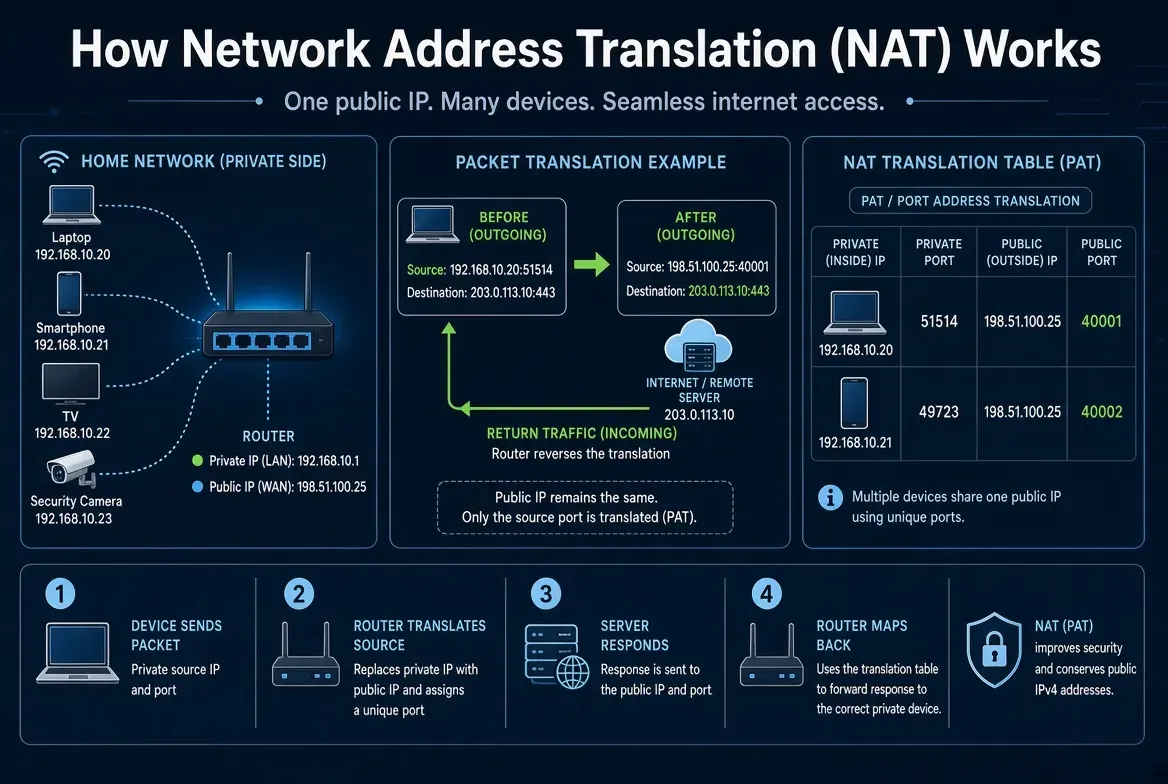
Network Address Translation (NAT) is a networking mechanism that changes IP address information as packets move between networks. It is commonly used to allow multiple devices with private IPv4 addresses to access external networks through a smaller number of public IPv4 addresses.
For example, a home network may contain a laptop, smartphone, television and security camera. Each device has its own private IPv4 address, but they can all access the Internet through one public IPv4 address.
The router makes this possible by translating addresses and, commonly, transport-layer port numbers.
However, NAT also introduces practical networking challenges. Online applications may work normally while remote access, gaming, VPN connections or self-hosted services fail.
Understanding NAT therefore requires more than knowing that it shares public IPv4 addresses. It also requires understanding how translation mappings are created, how return packets find the correct device and what happens when those mappings are unavailable.
This article explains how NAT works in practice, how to troubleshoot common NAT problems, and when directly routed public IPv4 connectivity may be appropriate.
What Is Network Address Translation (NAT)?
Network Address Translation is a function performed by a router, firewall, gateway or other network device that modifies IP addressing information as traffic passes through it.
In a typical home network, NAT translates a private IPv4 source address into a public-facing source address for outbound communication.
Consider:
Laptop: 192.168.10.20
Router's public IPv4: 198.51.100.25
Destination server: 203.0.113.10
When the laptop sends a packet toward the server, the router may translate its source address:
Before NAT
192.168.10.20 → 203.0.113.10
After NAT
198.51.100.25 → 203.0.113.10
The destination server sees the translated source address rather than the laptop's original private IPv4 address.
When the server responds, the NAT device uses its translation state to direct the response back toward the correct internal device.
The addresses 198.51.100.25 and 203.0.113.10 are RFC 5737 documentation addresses used here for illustration, not real Internet endpoints.
For background on public and private IP addressing, see How IP addresses work.
Why Do Networks Use NAT?
One of NAT's most important applications is conserving public IPv4 addresses.
IPv4 uses a 32-bit address space. As Internet connectivity expanded, demand for globally usable IPv4 addressing increased.
Rather than assigning a separate public IPv4 address to every device, many networks use private addresses internally and translate outbound traffic at the network edge.
RFC 1918 defines three private IPv4 address ranges:
| Private IPv4 range | CIDR prefix |
|---|---|
10.0.0.0 – 10.255.255.255 | 10.0.0.0/8 |
172.16.0.0 – 172.31.255.255 | 172.16.0.0/12 |
192.168.0.0 – 192.168.255.255 | 192.168.0.0/16 |
These addresses can be reused across independent private networks because they are not intended for direct routing across the public Internet.
NAT allows devices using these addresses to communicate with external IPv4 services through translated connectivity.
Nevertheless, NAT is not the only possible network architecture.
Some organisations use directly routed public IPv4 addresses, IPv6 connectivity, private interconnections or a combination of these approaches.
The appropriate design depends on addressing requirements, routing policy, application behaviour and operational needs.
How Does NAT Work Step by Step?
Consider a laptop accessing a website.
The network uses the following configuration:
| Component | Address |
|---|---|
| Laptop | 192.168.10.20 |
| Default gateway | 192.168.10.1 |
| Router's public-facing IPv4 | 198.51.100.25 |
| Website server | 203.0.113.10 |
The laptop opens a connection to the website using HTTPS on TCP port 443.
Step 1: The Laptop Sends a Packet
Suppose the laptop creates a TCP connection using source port 51514.
Its initial packet is addressed as follows:
Source:      192.168.10.20:51514
Destination: 203.0.113.10:443
Protocol:    TCP
The laptop determines that the destination is outside its directly connected subnet.
It therefore sends the packet through the route selected by its routing table, normally its default gateway.
The role of that next hop is explained in What Is a Default Gateway?.
Step 2: The Router Receives the Packet
The router receives the packet on its internal interface.
It examines the destination, applies relevant routing and security policies, and determines whether translation is required.
If an applicable NAT rule exists, the router creates or uses a translation mapping.
Step 3: NAT Changes the Source Address and Port
The router may translate the original source:
192.168.10.20:51514
into:
198.51.100.25:40001
The outgoing packet becomes:
Source:      198.51.100.25:40001
Destination: 203.0.113.10:443
Protocol:    TCP
The public address represents the router's translated connection.
The port number identifies the translated transport endpoint, allowing the router to distinguish it from other active connections.
Step 4: The Destination Server Responds
The website receives the packet and replies to:
198.51.100.25:40001
The server does not need to know that the original laptop uses 192.168.10.20.
Step 5: NAT Translates the Return Traffic
The router checks its translation state.
It finds the mapping:
198.51.100.25:40001 → 192.168.10.20:51514
It then translates the response destination and forwards the packet toward the laptop.
The result is a working connection between the private-network device and the remote server.
This is why ordinary web browsing often works without users manually configuring NAT.
Practical Example: Two Devices Sharing One Public IPv4 Address
Suppose two laptops use the same home router.
Laptop A
192.168.10.20
Laptop B
192.168.10.21
Both open HTTPS connections to:
203.0.113.10:443
The laptops happen to use the same local source port:
51514
Without appropriate address-and-port translation, the router could not distinguish the two connections using the same public address and translated port.
A Port Address Translation implementation can assign distinct external ports.
| Device | Original source | Translated source | Destination |
|---|---|---|---|
| Laptop A | 192.168.10.20:51514 | 198.51.100.25:40001 | 203.0.113.10:443 |
| Laptop B | 192.168.10.21:51514 | 198.51.100.25:40002 | 203.0.113.10:443 |
Both devices share:
198.51.100.25
However, the translated port numbers are different.
When return traffic arrives for port 40001, the router identifies Laptop A's connection.
When traffic arrives for port 40002, it identifies Laptop B's connection.
This is a fundamental reason why many devices can share one public IPv4 address simultaneously.
The exact port-selection behaviour depends on the NAT implementation. Some devices preserve the original port when possible, while others allocate a different one.
What Is a NAT Translation Table?
A NAT translation table records the mappings needed to translate traffic between internal and external addresses.
In address-and-port translation, an entry may include:
- Internal source IP address
- Internal source port
- Translated external IP address
- Translated external port
- Transport protocol
- Remote address and port, where relevant
- Connection or mapping state
- Activity and expiration information
A simplified table might look like this:
| Internal address | External mapping | Protocol | State |
|---|---|---|---|
192.168.10.20:51514 | 198.51.100.25:40001 | TCP | Active |
192.168.10.21:51514 | 198.51.100.25:40002 | TCP | Active |
192.168.10.30:53000 | 198.51.100.25:42010 | UDP | Active |
This example is deliberately simplified. Actual NAT implementations may store additional information and use different mapping and filtering rules.
Why Does the NAT Table Matter?
The translation table allows the device to associate response traffic with the appropriate internal connection.
If the required mapping disappears, the router may no longer know where to deliver subsequent packets.
This can cause connections to fail even when the router and Internet service remain online.
What Happens When a NAT Mapping Expires?
NAT devices maintain mappings for limited periods, subject to protocol-specific behaviour and device settings.
For example:
- A client creates a UDP flow.
- The NAT device creates a mapping.
- The application stops sending traffic.
- The mapping eventually expires.
- New inbound packets may no longer match an allowed mapping.
The application may then need to establish a new mapping.
Different devices use different expiration policies, so there is no universal timeout that applies to every NAT connection.
What Are the Different Types of NAT?
Several forms of address translation are used in practical networks.
| NAT type | Main function | Typical use |
|---|---|---|
| Static NAT | Maintains a configured address mapping | Servers or fixed-address requirements |
| Dynamic NAT | Selects translations from an address pool | Networks with multiple external addresses |
| Port Address Translation (PAT) | Translates addresses and transport ports | Multiple clients sharing one public IPv4 |
| Destination NAT (DNAT) | Changes destination addressing | Port forwarding and service publishing |
| Carrier-Grade NAT (CGNAT) | Translates traffic within a provider network | Large-scale IPv4 address sharing |
These terms describe related translation techniques rather than necessarily mutually exclusive products.
For example, port forwarding commonly uses destination translation together with stateful tracking and firewall rules.
Static NAT
Static NAT provides a configured mapping between addresses.
For example:
10.0.0.10 ↔ 198.51.100.10
This may be useful when an internal service requires predictable external address mapping.
However, a static mapping does not automatically make the service reachable.
Routing and firewall policies must also permit the desired traffic.
Dynamic NAT
Dynamic NAT selects an available address from a configured pool.
For example, internal devices may use available external addresses from a pool such as:
198.51.100.20–198.51.100.30
The selected translation depends on device configuration and available resources.
Port Address Translation (PAT)
PAT translates both addressing and transport-port information.
It is commonly used in home routers and enterprise gateways to allow multiple private devices to share fewer public IPv4 addresses.
PAT is also called Network Address Port Translation (NAPT) or NAT overload in some networking documentation.
Destination NAT (DNAT)
Destination NAT changes destination addressing, typically so that traffic reaching a public-facing address can be delivered to an internal service.
For example:
198.51.100.25:8443
may be translated to:
192.168.10.40:443
This is one possible implementation of port forwarding.
For a broader introduction to these mechanisms, i.LEASE explains Network Address Translation (NAT), including static NAT, dynamic NAT and PAT.
NAT vs PAT: What Is the Difference?
NAT is the general term for translating network addresses.
PAT is a form of translation that also uses transport-layer port information.
| NAT | PAT |
|---|---|
| General address-translation mechanism | Address-and-port translation |
| May use one-to-one or other mappings | Commonly supports many-to-one address sharing |
| May translate addresses without changing ports | Can modify transport port numbers |
| Useful in multiple network architectures | Common in residential and enterprise Internet gateways |
The distinction matters because modern home IPv4 sharing usually depends on more than changing the IP address.
The router also needs a way to distinguish multiple active connections using the same external address.
PAT provides that mechanism for supported transport protocols.
NAT vs Default Gateway: Are They the Same?
No.
A default gateway is a next-hop router used when a host needs to reach another network.
NAT is a translation function that may occur during packet forwarding.
A router can perform both roles, but they are not identical.
Consider:
Laptop → Default gateway → Internet
The laptop sends traffic toward its gateway because its routing table selects that next hop.
The gateway may then perform NAT before forwarding the traffic.
However, a router can forward packets between networks without translating their source or destination IP addresses.
Likewise, a firewall may perform NAT on traffic passing between different interfaces.
The difference is:
Routing determines where a packet should go.
NAT determines whether addressing information is translated along the way.
Does ARP Work with NAT?
Yes, but ARP and NAT solve different problems.
ARP resolves IPv4 addresses to local link-layer addresses.
NAT translates IP addressing information as traffic passes through a translation function.
For example, a laptop may use ARP to determine its router's MAC address before sending the packet to the gateway.
The router may then translate the packet's source IPv4 address before forwarding it to another network.
Therefore:
ARP → local next-hop delivery
NAT → address translation
For a practical explanation of the local delivery process, see Address Resolution Protocol (ARP).
What Is Port Forwarding?
Port forwarding allows selected inbound traffic to be directed from an external address and port to a particular internal service.
Suppose an organisation operates an internal HTTPS server:
192.168.10.40:443
Its router has the example public-facing address:
198.51.100.25
A forwarding rule might be configured as:
External:
198.51.100.25:8443

Internal:
192.168.10.40:443

Protocol:
TCP
When an authorised external client contacts the configured endpoint, the router translates the destination and forwards traffic to the internal server.
However, several conditions must be satisfied.
The router must receive the inbound traffic.
The configured NAT rule must match.
Firewall policies must permit the connection.
The internal service must be reachable and listening on the expected port.
If any of these conditions fail, the connection may not work.
Why Does Port Forwarding Sometimes Fail?
Common reasons include:
- The router does not have a directly reachable public IPv4 address.
- The ISP uses Carrier-Grade NAT.
- Another upstream router performs NAT.
- The forwarding rule uses the wrong internal address.
- The application is not listening on the configured port.
- A host or network firewall blocks the connection.
- The ISP restricts certain inbound traffic.
- Routing or DNS points clients to the wrong destination.
Therefore, creating a forwarding rule is not proof that the service is reachable from the Internet.
The complete forwarding path must be tested.
What Is Double NAT?
Double NAT occurs when traffic passes through two layers of network address translation.
This can happen when a home router is connected behind another router that also performs NAT.
For example:
Laptop
192.168.10.20
↓
Home router
WAN: 192.168.0.2
↓
ISP-supplied router
Public-facing IPv4
↓
Internet
The first router translates traffic from the laptop's network into the upstream private network.
The second router translates it again toward the Internet.
Ordinary outbound browsing may still work.
However, inbound connections and applications that rely on NAT traversal may become more difficult to configure.
Common Double NAT Symptoms
- Port forwarding does not work as expected.
- Remote access is unavailable.
- Some gaming or peer-to-peer connections fail.
- A service is reachable locally but not externally.
- Applications report restrictive NAT behaviour.
Double NAT does not guarantee that every application will fail. Many applications work normally through multiple translation layers.
The important question is whether the application requires inbound connectivity or behaviour that the configured NAT path does not support.
How to Detect Double NAT
A useful starting point is to inspect the WAN IPv4 address shown in the router's administration interface.
Suppose the router reports:
192.168.0.2
This indicates that its WAN interface uses a private IPv4 address.
It may be behind another router performing NAT.
Next, identify the upstream network device and determine whether another translation layer exists.
However, a private WAN address alone does not prove the full network topology. The upstream device could be part of a deliberately routed private network.
To establish the cause, verify:
- The local router's WAN configuration.
- The upstream gateway.
- The addresses assigned to upstream interfaces.
- The location of NAT rules.
- Whether inbound traffic reaches the expected network edge.
A properly documented path is more reliable than assuming that every private WAN address represents the same problem.
How to Fix Double NAT
The correct solution depends on who controls the network and what the application requires.
Possible approaches include:
Use Bridge Mode Where Supported
Some ISP-provided devices support bridge mode, allowing a separate router to manage the relevant Internet connection.
This can eliminate an unnecessary customer-side NAT layer.
However, bridge mode availability depends on the service and equipment.
Use a Single Routing and NAT Device
Where appropriate, configure one device to perform routing and NAT while another operates only as an access point or switch.
This is a common approach in home and small-office networks.
Configure the Necessary Forwarding Path
Where multiple translation layers must remain, carefully configured forwarding rules may be required at each relevant layer.
Firewall and access restrictions must also be considered.
Use an Appropriate Remote-Access Architecture
Some applications can use outbound-established tunnels, VPN services or relays rather than relying on direct inbound port forwarding.
This can be useful where the user does not control the upstream NAT environment.
Nevertheless, the chosen solution should be evaluated for authentication, security, performance and operational continuity.
What Is Carrier-Grade NAT (CGNAT)?
Carrier-Grade NAT, commonly called CGNAT, is address translation performed within an Internet service provider's network.
Instead of assigning each customer a separately reachable public IPv4 address, the provider may allow multiple subscribers to share public IPv4 resources.
A simplified path is:
Customer device
↓
Customer router
↓
ISP CGNAT system
↓
Public Internet
The customer may therefore be behind both local NAT and provider-side NAT.
RFC 6888 describes common requirements for Carrier-Grade NAT systems.
What Is the 100.64.0.0/10 Address Range?
RFC 6598 reserves:
100.64.0.0/10
as Shared Address Space.
This range is intended for use in service-provider address-sharing environments, including between customer equipment and CGN systems.
It covers:
100.64.0.0 – 100.127.255.255
If a home router receives an address within this range, that is a strong indication that the connection uses provider shared-address infrastructure.
However, not every CGNAT deployment exposes an address from this range to the customer, and a shared-range address should still be interpreted alongside the actual provider configuration.
Why Does CGNAT Affect Inbound Connections?
In a CGNAT deployment, the customer normally does not control the provider's translation system.
As a result, configuring port forwarding on the customer router may not be sufficient.
Even if the customer router correctly forwards traffic internally, the provider-side translator must also allow the incoming connection to reach that customer.
This limitation can affect:
- Self-hosted services
- Remote CCTV access
- Certain VPN configurations
- Peer-to-peer applications
- Gaming connections
- Remote administration
- Applications requiring predictable inbound endpoints
For a dedicated explanation of provider-side address sharing, see Carrier-Grade NAT (CGNAT).
NAT vs CGNAT: Key Differences
| Feature | Customer-side NAT | Carrier-Grade NAT (CGNAT) |
|---|---|---|
| Typical operator | Home or enterprise network | Internet service provider |
| Location | Customer router/firewall | Provider infrastructure |
| Public IPv4 sharing | Across local devices | Across multiple customers |
| Customer control | Often configurable | Usually limited |
| Port forwarding | May be configurable | Depends on provider support |
| Troubleshooting | Local network and router | May require ISP involvement |
| Translation logs | Customer device, if supported | Provider systems, subject to policy |
The distinction matters because the ability to change NAT settings depends on who operates the translation device.
A customer may control the home router but not the upstream provider's NAT environment.
Why Do Some Applications Work Behind NAT While Others Fail?
Many Internet applications initiate connections from the internal network toward an external service.
The NAT device creates state for those outbound connections and can translate the associated response traffic.
However, applications that expect unsolicited inbound connections may encounter additional restrictions.
Examples include:
- Some remote-access services
- Certain multiplayer games
- Peer-to-peer systems
- Direct device-to-device communication
- Self-hosted applications
- Some real-time communications
These applications may require a public endpoint, compatible NAT traversal mechanisms or an intermediate relay.
NAT Mapping and Filtering Behaviour
Two NAT devices can translate addresses differently even when they are both described as PAT implementations.
The relevant behaviour includes:
- How external ports are allocated
- Whether mappings can be reused
- Which external endpoints may send packets through a mapping
- How quickly mappings expire
- How TCP and UDP traffic is handled
For example, one NAT configuration may permit return packets only from an expected remote endpoint.
Another may use a more permissive filtering policy.
These differences can affect peer-to-peer connectivity and NAT traversal.
RFC 4787 and RFC 5382 describe behavioural requirements for NAT devices handling UDP and TCP.
Therefore, troubleshooting should focus on the actual device behaviour rather than assuming all NAT products operate identically.
NAT vs Firewall: Does NAT Improve Security?
NAT and firewall filtering are different functions.
NAT translates network addressing information.
A firewall evaluates traffic against security policies.
They are frequently implemented on the same device, but one does not automatically replace the other.
| NAT | Firewall |
|---|---|
| Translates addresses and sometimes ports | Allows or blocks traffic based on policy |
| Maintains translation mappings | May maintain connection state |
| Supports address sharing | Enforces access rules |
| Does not inherently encrypt traffic | Does not inherently encrypt traffic |
| Is not a complete security control | Can enforce network security boundaries |
NAT can make internal addressing less directly visible to external services, but that is not equivalent to authentication, encryption or comprehensive attack prevention.
A device behind NAT can still be exposed through malicious outbound activity, compromised applications, unsafe forwarding rules or permitted connections.
Likewise, a service using a public IPv4 address can be appropriately protected through firewall rules, authentication and other security controls.
NAT should not be treated as a security guarantee.
How to Troubleshoot NAT Connection Problems
A reliable investigation should identify where communication stops.
Changing multiple router settings without understanding the network path can make the problem harder to diagnose.
Step 1: Identify the Connection Direction
Determine whether the failing connection is:
- Outbound from a local device
- Inbound from an external client
- Between two private networks
- Between two endpoints behind NAT
- Or part of a VPN or tunnel
This distinction is essential.
Outbound failures and inbound failures often have different causes.
Step 2: Check the Client's IP Configuration
On Windows:
ipconfig /allOn Linux:
ip -4 addr
ip -4 route
Verify that the client has the expected IPv4 address, subnet and gateway.
Step 3: Test the Relevant Destination
On Windows, a TCP connectivity test can be performed with:
Test-NetConnection example.com -Port 443This can help determine whether the tested TCP endpoint is reachable.
However, a successful TCP test does not prove that every application protocol or inbound path is working.
Step 4: Inspect the Router's WAN Address
Check whether the router's WAN address is:
- A globally usable public IPv4 address
- An RFC 1918 private address
- An RFC 6598 shared-space address
- Or another specially assigned address
This helps identify where translation may occur.
Do not assume the address shown by an external IP-checking website is necessarily configured directly on the customer router.
Under CGNAT, the externally observed address can belong to the provider's translation system.
Step 5: Review NAT Rules and Connection State
If the router or firewall supports NAT diagnostics, inspect:
- Active translation entries
- Port forwarding rules
- Source and destination NAT policies
- Connection tracking
- Mapping expiration
- Session limits
- Translation or policy error logs
On Linux routers with connection tracking tools installed, administrators may be able to inspect entries using:
sudo conntrack -LThe command requires suitable permissions and tooling. Its output reflects connection-tracking state and does not automatically mean every listed connection is undergoing NAT.
Step 6: Verify Firewall and Application Rules
For inbound services, confirm:
- The service is listening on the intended interface.
- The internal destination address is correct.
- The port mapping is correct.
- The router's firewall permits the connection.
- The host firewall permits the connection.
- The upstream network allows the traffic.
Step 7: Test From Outside the Local Network
If testing a published service, use an appropriate external connection.
Testing a public address from inside the same LAN may depend on hairpin NAT, sometimes called NAT loopback.
Some routers support this behaviour; others may not.
Therefore, a failed internal test using the public address does not necessarily mean the service is unreachable from outside.
Step 8: Identify the Root Cause Before Changing the Design
Once the failing network boundary is identified, determine whether the appropriate solution involves:
- Correcting a NAT rule
- Fixing a firewall policy
- Updating an application configuration
- Removing unnecessary double NAT
- Requesting a different ISP service
- Using a secure relay or tunnel
- Or changing the public addressing architecture
The goal is to restore the required connectivity without introducing unnecessary exposure or new points of failure.
Common NAT Problems and Possible Causes
| Problem | Possible cause | First check |
|---|---|---|
| Internet works, but remote access fails | Inbound traffic blocked or no reachable public endpoint | WAN address and forwarding path |
| Port forwarding configured but unavailable | CGNAT, double NAT, firewall or service problem | Upstream NAT and service listener |
| Game reports restrictive NAT | Mapping/filtering behaviour | Router settings and ISP NAT |
| VPN disconnects after inactivity | NAT mapping expiration or other session timeout | VPN logs and translation behaviour |
| Some applications work, others fail | Protocol-specific translation or policy issue | Affected ports and flows |
| Access works locally but not externally | No valid inbound path | Routing, NAT and firewall |
| Public-address test fails only from LAN | Hairpin NAT unsupported or disabled | External-network test |
| Connections fail under heavy load | NAT/session resource pressure | Device capacity and logs |
| Intermittent access after router replacement | Changed forwarding or firewall rules | Compare old and new configuration |
These are diagnostic possibilities, not automatic conclusions. More than one condition may be present.
When Is Public IPv4 Needed Instead of NAT?
NAT is useful for many workloads, especially ordinary outbound client access.
However, some organisations require externally reachable services, predictable addressing or direct control over their public network endpoints.
Examples may include:
- Publicly accessible application servers
- Hosting infrastructure
- Customer-facing network services
- Direct VPN endpoints
- Public-facing network appliances
- Systems with externally managed IP allowlists
- Services that need predictable inbound connectivity
In these environments, directly routed public IPv4 addressing may offer operational advantages over relying entirely on provider-side translation.
However, having a public IPv4 address does not automatically guarantee unrestricted inbound access.
The address must be appropriately assigned or made available, routed to the correct network and permitted through relevant security controls.
For broader context, LARUS discusses why public IPv4 connectivity remains important for services requiring globally reachable addressing.
Public IPv4 Does Not Automatically Eliminate NAT
A network may have a public IPv4 address and still intentionally perform NAT for internal devices.
Similarly, obtaining public IPv4 address resources does not automatically bypass an ISP's CGNAT system.
The operator must verify how the public address or prefix will be delivered and routed.
Possible arrangements include:
- A public IPv4 address directly assigned to an interface
- A routed public IPv4 subnet
- A provider-managed NAT or forwarding service
- A public address delivered through a supported tunnel or upstream routing arrangement
The correct solution depends on the service provider, equipment and intended network architecture.
Does NAT Solve IPv4 Exhaustion?
NAT helps reduce the number of public IPv4 addresses required by networks.
It does this by allowing address sharing and private address reuse.
However, NAT does not increase the size of the IPv4 address space.
IPv4 still contains 32-bit addresses.
Therefore, NAT is best understood as an address-efficiency technique rather than a source of new IPv4 addresses.
There are also operational trade-offs.
Dense address sharing may introduce:
- Additional translation state
- Port allocation constraints
- More complex troubleshooting
- Inbound reachability limitations
- Dependence on translation infrastructure
- Additional logging and attribution requirements
These issues become especially important in large-scale provider networks.
For organisations managing many networks and address ranges, IP Address Management (IPAM) can help maintain accurate records of internal subnets, reservations and assignments.
However, IPAM records should not be confused with the actual NAT translation state of a gateway.
A database may document that an address belongs to a particular network, while live translation tables show how specific packets are being handled at a particular time.
Both forms of information can be useful, but they answer different operational questions.
Can a Public IPv4 Address Identify a Specific Device or User?
Not necessarily.
When multiple devices share one public IPv4 address through NAT, the external address alone may not identify which internal device initiated a connection.
For example:
Laptop A
192.168.10.20
Laptop B
192.168.10.21
Both may appear externally as:
198.51.100.25
Distinguishing the connections may require additional information, such as:
- Transport protocol
- Source port
- Destination information
- Accurate timestamps
- Relevant translation records
In CGNAT environments, this challenge can extend across multiple customers.
RFC 6269 discusses operational issues associated with IP address sharing.
Therefore, a public IPv4 address should not automatically be treated as proof of one device, one person or one organisation's activity at a particular moment.
Address registration, routing visibility, NAT state and user attribution are different forms of evidence.
Does IPv6 Need NAT?
IPv6 provides a much larger address space than IPv4.
In ordinary IPv6 deployments, devices can use globally routable IPv6 addresses without needing the same many-to-one address sharing commonly used with private IPv4 networks.
This allows networks to use end-to-end IPv6 routing, subject to firewall policies and other controls.
However, some IPv6 environments use translation mechanisms for specific requirements.
For example, NAT64 can allow IPv6-only clients to communicate with IPv4 services through a translation gateway.
RFC 6146 describes stateful NAT64.
Therefore, it would be inaccurate to say that IPv6 networks never use translation.
A more precise distinction is:
IPv4 NAT44/PAT
Often used to share limited public IPv4 address capacity.
Native IPv6
Can provide routed connectivity without mandatory address-sharing NAT.
NAT64
Can support communication between IPv6 and IPv4 environments.
For additional context on deployment challenges, see Why IPv6 Adoption Is Still Slow.
NAT and Network Continuity: What Should Operators Monitor?
NAT can become an important operational dependency when applications rely on a particular gateway or translation path.
If that gateway fails or its configuration changes, affected connections may be interrupted.
For example, a company may rely on:
- A particular public IPv4 endpoint
- Stable NAT forwarding rules
- Existing VPN connections
- Application allowlists
- Persistent translation state
- Provider-side address-sharing infrastructure
Changing the network edge without planning for these dependencies may disrupt services even when the internal servers remain operational.
A practical continuity plan should address:
- Addressing: Which internal and external addresses are used?
- Routing: How does traffic reach the gateway?
- Translation: Which NAT rules and mappings are required?
- Security: Which firewall and access policies apply?
- Dependencies: Which applications require specific ports or endpoints?
- Failover: What happens if the translation device becomes unavailable?
- Records: Are configurations and network responsibilities documented?
- Verification: Can the intended service be reached after a change?
These questions reflect a fundamental networking principle: service continuity depends on the actual forwarding path and its operational dependencies, not merely on how an address is described in a configuration database.
A stable public IP address can be useful, but successful delivery also depends on routing, gateway availability, application configuration and the surrounding network infrastructure.
NAT Troubleshooting Checklist
Before concluding that NAT is responsible for a connectivity failure, verify the following:
This checklist is especially helpful when remote access, VPN connections, self-hosted applications or peer-to-peer services stop working.
Conclusion
Network Address Translation is an important part of modern IPv4 connectivity.
It allows devices using private IPv4 addresses to communicate with external networks through translated addresses and, in many cases, port numbers.
The basic process is:
Private device → NAT gateway → translated public-facing endpoint → external service
Return traffic is then mapped back to the appropriate internal connection.
However, NAT is more than a simple address-sharing mechanism.
Its behaviour depends on translation mappings, connection state, filtering policies, network routing and the infrastructure operating the gateway.
This is why a network can support ordinary Internet browsing while still experiencing problems with remote access, port forwarding, gaming, VPN connections or self-hosted applications.
The most effective troubleshooting approach is to identify the actual traffic path, determine where translation occurs and verify which device controls the relevant connection state.
For organisations requiring predictable public connectivity, the decision is not simply whether to use NAT.
It is whether the chosen addressing and routing architecture provides the reachability, security, operational visibility and continuity that the application requires.
Frequently Asked Questions
1. What is NAT in simple terms?
Network Address Translation is a mechanism that changes IP addressing information as packets pass through a router or gateway. It commonly allows multiple private IPv4 devices to communicate with external networks through shared public IPv4 connectivity.
2. What is the main purpose of NAT?
One common purpose is reducing the number of public IPv4 addresses required by allowing private-network devices to share external address resources.
NAT can also be used for other routing and network-design requirements.
3. How does NAT work?
A NAT device translates address information in packets and maintains relevant mapping state. When matching return traffic arrives, it uses that state to deliver the packets toward the appropriate internal device.
4. What is the difference between NAT and PAT?
NAT is the broader address-translation mechanism. PAT is a form of NAT that also translates transport-layer ports, commonly allowing multiple devices to share one public IPv4 address.
5. Does NAT change the IP address?
Yes. NAT can change a packet's source IP address, destination IP address or both, depending on the translation rule. PAT may also change transport-layer port numbers.
6. What is a NAT table?
A NAT table records information used to associate translated addresses and ports with their original connections or endpoints.
7. Why does port forwarding fail?
Possible causes include incorrect forwarding rules, firewall restrictions, unavailable application ports, double NAT, CGNAT or an upstream network that does not deliver inbound traffic to the customer router.
8. What is double NAT?
Double NAT occurs when traffic passes through two address-translation layers, such as a home router operating behind another NAT-enabled router.
9. Is double NAT always bad?
No. Many outbound applications work normally through double NAT. However, additional translation layers can complicate inbound connectivity, application compatibility and troubleshooting.
10. How do I know if my ISP uses CGNAT?
Check your router's WAN IPv4 address and compare it with the network's actual externally visible public address. A WAN address in 100.64.0.0/10 is a strong indicator of shared-address infrastructure, although ISP confirmation may be needed to establish the precise arrangement.
11. Can I port forward with CGNAT?
Ordinary customer-router port forwarding may not be sufficient because the ISP also controls an upstream translation layer. Possible alternatives depend on provider support and application requirements.
12. Does NAT improve security?
NAT is not a substitute for a firewall. It can affect reachability and address visibility, but security still depends on filtering rules, authentication, encryption and other protective controls.
13. Can two devices use the same public IPv4 address?
Yes. PAT allows multiple private devices to share a public IPv4 address by using distinct translated transport endpoints.