
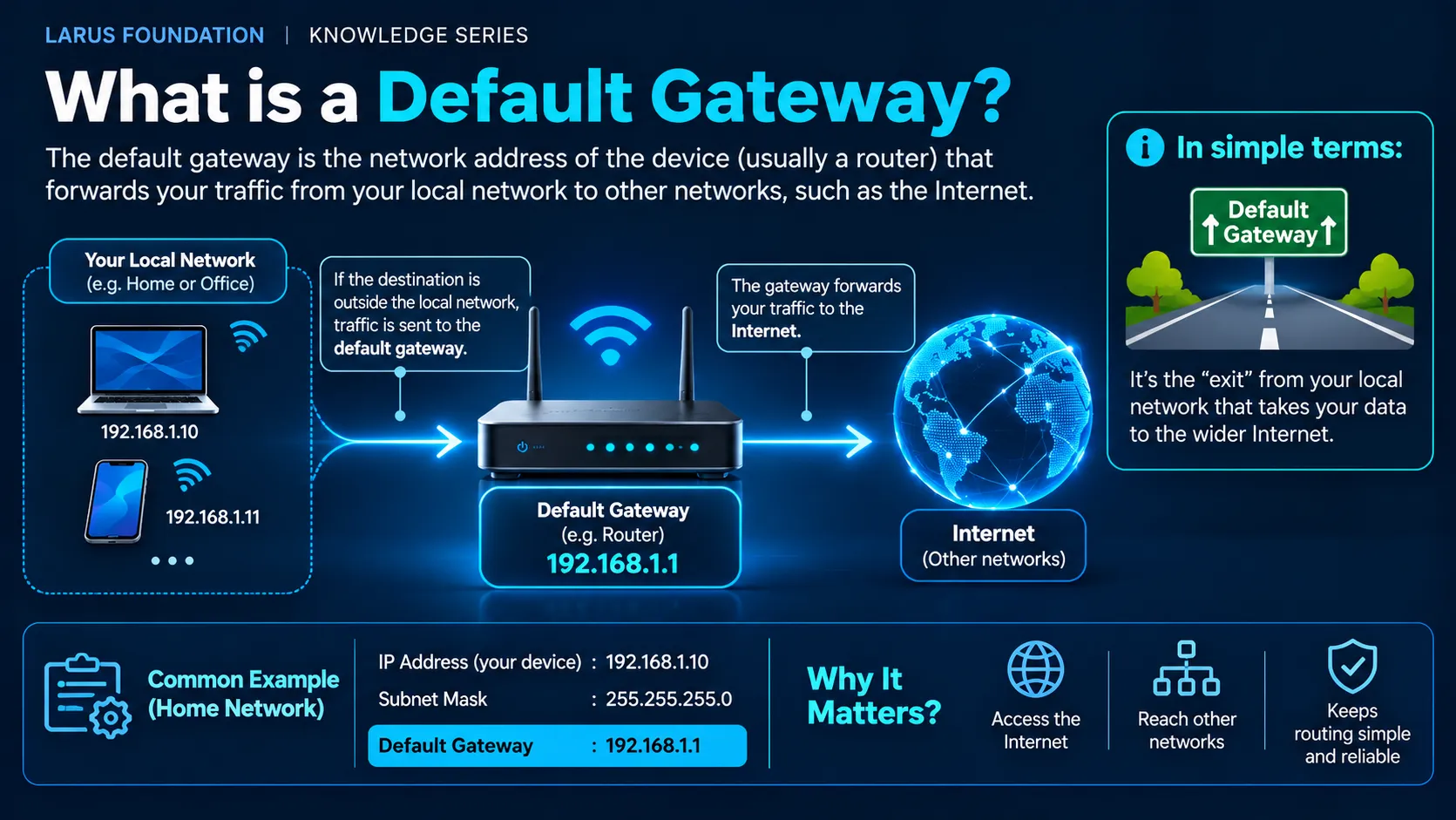
A default gateway is the network device or next-hop router that a computer uses when it needs to send traffic to a destination outside its directly connected network.
For example, a laptop might have:
IPv4 address:     192.168.1.20
Subnet mask:      255.255.255.0
Default gateway:  192.168.1.1
If the laptop wants to communicate with another device at:
192.168.1.50
the destination is on the same local network, so the laptop can communicate with it directly.
However, if the laptop wants to reach:
8.8.8.8
the destination is outside the local network.
Therefore, the laptop sends the packet toward its default gateway:
192.168.1.1
The gateway then forwards the packet toward another network.
The simplest way to remember it is:
Local destination → send directly. Remote destination → send to the default gateway.
This small decision is fundamental to how computers move traffic from a home, office or data-centre network toward the wider Internet.
For background on how IPv4 addressing works, see LARUS.Foundation's guide to What Is an IP Address and How Does It Work?.
What Is a Default Gateway?
A default gateway is normally a router interface reachable from the device's local network.
Its job is to provide a path toward networks that the device does not know how to reach directly.
Consider:
Laptop
192.168.1.20
Gateway
192.168.1.1
Remote website
203.0.113.50
The laptop is directly connected to the 192.168.1.0/24 network.
However, 203.0.113.50 is not part of that network.
Therefore, the laptop needs another system to forward the packet.
That system is the gateway.
A simplified flow is:
Laptop
↓
Destination is not local
↓
Default gateway
↓
Other routers/networks
↓
Destination
The gateway does not necessarily know the complete path to the final destination itself.
Instead, it may forward the packet to another router, which forwards it again.
Why Is It Called a Default Gateway?
The word default is important.
A device can have multiple routes.
For example:
| Destination | Next action |
|---|---|
192.168.1.0/24 | Directly connected |
10.20.0.0/16 | Send through a specific router |
| Everything else | Use default gateway |
The default route is effectively the fallback route.
Conceptually:
If no more specific route matches the destination, use this gateway.
In IPv4 routing tables, a default route is commonly represented as:
0.0.0.0/0
This means that the route can match any IPv4 destination when no more specific route takes priority.
Therefore, a default gateway is not simply:
the router that connects to the Internet.
More precisely, it is:
the next-hop gateway selected when the routing table does not contain a more specific route for the destination.
How Does a Default Gateway Work?
Suppose a laptop has:
IPv4 address: 192.168.1.20
Subnet mask: 255.255.255.0
Default gateway: 192.168.1.1The laptop wants to send traffic to:
8.8.8.8
The process can be simplified into several steps.
Step 1: Check the Destination IP Address
The laptop compares the destination with its local network.
Its local network is:
192.168.1.0/24
The destination:
8.8.8.8
is not inside that network.
Therefore, the laptop knows that it cannot deliver the packet directly to the destination over its local network.
Step 2: Check the Routing Table
The operating system checks its routing information.
If there is no more specific route for 8.8.8.8, it uses the default route.
For example:
0.0.0.0/0 → 192.168.1.1
That tells the operating system:
Send otherwise unmatched IPv4 traffic to 192.168.1.1.
Step 3: Find the Gateway's MAC Address
The laptop knows the gateway's IPv4 address:
192.168.1.1
However, if it is using Ethernet or Wi-Fi locally, it also needs a link-layer destination.
For IPv4, ARP can be used to discover the gateway's MAC address.
The process becomes:
Gateway IPv4
192.168.1.1
↓ ARP
Gateway MAC
AA:BB:CC:DD:EE:FF
For more detail on how IPv4 and MAC addressing interact, see IPv4 Address vs MAC Address.
Step 4: Send the Frame to the Gateway
The laptop creates an IP packet containing:
Source IPv4: 192.168.1.20
Destination IPv4: 8.8.8.8
However, the local Ethernet frame is addressed to:
Source MAC: Laptop MAC
Destination MAC: Gateway MAC
This distinction is important.
The laptop is not trying to discover the MAC address of 8.8.8.8.
Instead, it sends the frame to the next local hop—the default gateway.
Step 5: The Gateway Forwards the Packet
The router receives the Ethernet frame and processes the IP packet.
It examines:
Destination IPv4: 8.8.8.8
Then it checks its own routing table and forwards the packet toward the appropriate next hop.
That process may repeat across several routers before the packet reaches its destination.
Practical Example: Opening a Website
Suppose your PC has:
IPv4:     192.168.1.25
Gateway:  192.168.1.1
You enter a website into your browser.
After DNS resolves the domain name, suppose the destination server is:
203.0.113.100
The traffic flow is roughly:
Browser
↓
Destination server = 203.0.113.100
↓
Operating system checks route
↓
Destination is remote
↓
Use gateway 192.168.1.1
↓
ARP finds gateway MAC
↓
Frame goes to router
↓
Router forwards packet
↓
ISP / Internet routers
↓
Website server
Therefore, several different networking systems participate:
DNS identifies the website's IP address.
Routing determines the next hop.
ARP helps reach the gateway locally.
The default gateway forwards the packet beyond the local network.
Local Traffic vs Gateway Traffic
The difference is easiest to see in one table.
Assume:
Device IP: 192.168.1.20
Subnet:    192.168.1.0/24
Gateway: 192.168.1.1| Destination | Local or remote? | What happens? |
|---|---|---|
192.168.1.50 | Local | Send directly |
192.168.1.80 | Local | Send directly |
192.168.1.1 | Local | Send directly to gateway itself |
10.0.0.5 | Remote | Use routing table |
8.8.8.8 | Remote | Usually use default gateway |
| Public website | Remote | Usually use default gateway |
Therefore:
Not every packet goes through the default gateway.
Traffic between devices on the same local subnet normally does not need the router to forward it between networks.
Default Gateway vs IP Address
These terms are often confused because the gateway itself normally has an IP address.
| IP Address | Default Gateway |
|---|---|
| Identifies an interface in an IP network | Provides a next hop toward other networks |
| A laptop can have one | Router/interface can serve as gateway |
Example: 192.168.1.20 | Example: 192.168.1.1 |
| Used as source/destination addressing | Used when forwarding remote traffic |
| Does not automatically mean router | Usually points to a routing device |
Your computer's own IPv4 address and its default-gateway address should normally be different.
For example:
Computer: 192.168.1.20
Gateway:  192.168.1.1
However, both must normally be reachable through the appropriate local network configuration.
Default Gateway vs Router
A router and a default gateway are closely related, but the terms do not mean exactly the same thing.
A router is a device or network function that forwards packets between IP networks.
A default gateway describes the routing role that a next-hop router performs for a host.
For example, your home router may act as:
- Wi-Fi access point,
- Ethernet switch,
- DHCP server,
- NAT device,
- firewall,
- DNS forwarder,
- and default gateway.
Therefore:
A gateway is a role in the forwarding path; a router is the device or function that commonly performs that role.
In larger networks, the distinction becomes more obvious.
A company may have many routers, but a particular workstation may use only one or a small set of them as its default gateways.
Default Gateway vs DNS Server
These two settings solve completely different problems.
| Default Gateway | DNS Server |
|---|---|
| Helps packets reach other networks | Converts names into IP addresses |
| Routing function | Name-resolution function |
Example: 192.168.1.1 | Example: 1.1.1.1 |
| Needed to reach remote IP networks | Needed to resolve domain names |
| Does not translate domain names | Does not route normal user traffic |
Suppose you enter:
example.com
DNS may answer:
203.0.113.100
But your computer still needs a route to reach 203.0.113.100.
If the server is remote, that route may use the default gateway.
Therefore:
DNS answers:
What IP address belongs to this name?
Default gateway answers operationally:
Where should I send this remote traffic next?
Default Gateway vs DHCP Server
DHCP is another commonly confused concept.
A DHCP server can automatically provide a device with network configuration such as:
- IPv4 address,
- subnet mask,
- default gateway,
- DNS servers,
- lease information.
Therefore, DHCP may tell the device what its default gateway is.
But DHCP is not necessarily the gateway itself.
For example:
DHCP server:      192.168.1.5
Default gateway:  192.168.1.1
Client:           192.168.1.20
These functions can exist on separate systems.
In many home routers, however, one device performs both functions.
That is why users often think DHCP, router and gateway all mean the same thing.
They do not.
Default Gateway vs Subnet Mask
The subnet mask helps the device determine whether a destination is directly connected or remote.
For example:
IP address:  192.168.1.20
Subnet mask: 255.255.255.0
This corresponds to:
192.168.1.0/24
A destination such as:
192.168.1.50
belongs to that local network.
Therefore:
Destination local → direct delivery
However:
192.168.2.50
is outside the /24.
Therefore:
Destination remote → routing required
If no more specific route exists, the default gateway is used.
The relationship is:
IP address + subnet mask
↓
Determine whether destination is local
↓
If remote
↓
Check routes
↓
Use default gateway if appropriate
This is why understanding subnetting is important for understanding gateways.
What Happens If the Default Gateway Is Wrong?
An incorrect gateway can produce a very common symptom:
Local network works, but the Internet does not.
For example:
Computer IP: 192.168.1.20
Gateway:     192.168.2.1
If the computer is actually connected to:
192.168.1.0/24
then 192.168.2.1 may not be directly reachable from that interface.
The computer may still communicate with:
192.168.1.50
because both devices are local.
However, communication with remote networks can fail.
Typical symptoms include:
- local printer works,
- local NAS works,
- other computers on the LAN respond,
- Internet websites fail,
- remote servers cannot be reached.
Therefore, checking the gateway is an important troubleshooting step.
What Happens If There Is No Default Gateway?
A computer does not always require a default gateway.
For example, consider an isolated network:
Computer A: 192.168.10.10
Computer B: 192.168.10.20
If both devices only need to communicate locally, they can do so without a gateway.
RFC 1122 specifically requires hosts to be able to operate in a minimal network environment even when no gateway exists.
However, without an appropriate route or gateway, the host generally cannot reach remote IP networks.
Therefore:
A gateway is required for reaching other networks—not for every form of local IP communication.
Can Multiple Devices Use the Same Default Gateway?
Yes.
This is completely normal.
A home network may have:
Laptop       192.168.1.20
Phone        192.168.1.21
TV           192.168.1.22
Printer      192.168.1.23
All four devices could use:
192.168.1.1
as their default gateway.
The router then forwards traffic for many devices toward external networks.
Therefore, a default gateway is usually a shared network resource, not something dedicated to one computer.
Can a Computer Have More Than One Default Gateway?
Yes, although configuration and operating-system behaviour matter.
RFC 1122 requires an IP host implementation to support multiple default gateways.
Multiple gateways may be used for:
- redundancy,
- multiple network interfaces,
- failover,
- different network paths,
- enterprise routing designs.
For example:
Gateway A
Primary connection
Gateway B
Backup connection
If one path fails, another may be selected depending on how the host or network is configured.
However, simply entering multiple gateways does not automatically create reliable load balancing or failover.
Route metrics, interface priorities and network design still matter.
What Is a Default Route?
The default route is the routing-table entry that directs traffic toward the default gateway when no more specific route matches.
In IPv4, it is commonly written:
0.0.0.0/0
For example:
Destination: 0.0.0.0/0
Gateway:     192.168.1.1
This effectively says:
For destinations not matched by a more specific route, forward traffic through 192.168.1.1.
However, routing uses the most specific matching route.
Suppose the table contains:
10.0.0.0/8      → Gateway A
0.0.0.0/0       → Gateway B
Traffic to:
10.20.30.40
uses Gateway A because 10.0.0.0/8 is more specific.
Traffic to another unmatched destination may use Gateway B.
Therefore:
The default route is the fallback, not automatically the first route used.
Why Doesn't the Gateway Replace the Destination IP?
Suppose:
Laptop:      192.168.1.20
Gateway:     192.168.1.1
Destination: 8.8.8.8
When the laptop sends the packet to the gateway, the IP destination remains:
8.8.8.8
The gateway's local MAC address is used to deliver the frame to the router.
Conceptually:
Ethernet destination
Gateway MAC
but:
IP destination
8.8.8.8
This is exactly why understanding IPv4 vs MAC Address is useful.
The MAC destination identifies the next local receiver.
The IP destination identifies where the packet is ultimately trying to go.
What Happens at the Gateway When NAT Is Used?
For production networks that need directly routable address space rather than relying only on private addressing and NAT, access to stable public IPv4 capacity can become part of the network design. Many home and office networks use private IPv4 addresses such as:
192.168.x.x
These private addresses are not normally routed directly across the public Internet.
Therefore, a home router often performs Network Address Translation, or NAT.
A simplified flow may be:
Laptop
192.168.1.20
↓ Default gateway
Router
Private side: 192.168.1.1
Public side: public IPv4 address
↓ NAT
Internet
The router changes relevant addressing information so that multiple private-network devices can communicate through public network connectivity.
However:
Default gateway and NAT are different functions.
A router can act as a gateway without performing NAT.
Likewise, enterprise routers frequently forward traffic between routed networks where NAT is not required.
How Does DHCP Provide a Default Gateway?
In many networks, users do not manually configure their gateway.
DHCP supplies the information automatically.
The DHCP configuration may tell the client:
Your IPv4 address: 192.168.1.20
Subnet mask:       255.255.255.0
Default gateway:   192.168.1.1
DNS server:        192.168.1.1
Therefore, if a device receives the wrong gateway through DHCP, many clients can experience the same connectivity problem.
This makes DHCP configuration important when troubleshooting widespread gateway issues.
How Do You Find Your Default Gateway on Windows?
Open Command Prompt and run:
ipconfigLook for:
Default GatewayFor more routing detail, run:
route printThe routing table can show which gateway is associated with the default route and other specific routes.
PowerShell can also provide detailed IP configuration information.
How Do You Find Your Default Gateway on macOS?
On macOS, Terminal can be used to inspect routing information.
A commonly useful command is:
route -n get defaultYou can also inspect the routing table using:
netstat -rnLook for the default route and the associated gateway.
How Do You Find Your Default Gateway on Linux?
A common Linux command is:
ip routeThe output may contain something similar to:
default via 192.168.1.1 dev eth0This means:
Default gateway: 192.168.1.1
Interface: eth0
Default Gateway Troubleshooting Checklist
If local connectivity works but remote connectivity fails, check:
- Does the device have a valid IPv4 address?
- Is the subnet mask correct?
- Is a default gateway configured?
- Is the gateway address in the expected local subnet?
- Can the device ping or otherwise reach the gateway?
- Does ARP resolve the gateway to a MAC address?
- Did DHCP provide the correct gateway?
- Is the router itself online?
- Does the router have an upstream route?
- Is another more specific route overriding the default?
- Is a firewall blocking the traffic?
- Is NAT required and correctly configured?
A practical troubleshooting flow is:
Check client IP
↓
Check subnet mask
↓
Check default gateway
↓
Test local gateway reachability
↓
Check ARP / neighbor information
↓
Inspect routing table
↓
Test remote IP connectivity
↓
Then check DNS
This last distinction is especially useful.
If:
8.8.8.8
is reachable but:
example.com
is not, the problem may be DNS rather than the gateway.
Does IPv6 Have a Default Gateway?
Yes.
IPv6 hosts also need routing information for destinations that are not directly reachable.
However, IPv6 handles some local discovery differently from IPv4.
IPv4 commonly uses:
ARP
to resolve a next-hop IPv4 address to a link-layer address.
IPv6 uses Neighbor Discovery, based on ICMPv6.
IPv6 routers can also advertise routing information to hosts through Router Advertisements.
Therefore, the overall routing concept remains similar:
Destination local?
Communicate locally.
Destination remote?
Use an appropriate router or default route.
However, the discovery mechanisms differ.
Default Gateway vs Default Route vs Router
These three terms are related but should not be treated as identical.
| Term | Meaning |
|---|---|
| Router | Device/function that forwards packets between networks |
| Default gateway | Next-hop router used for otherwise unmatched destinations |
| Default route | Routing-table entry that points traffic toward the default gateway |
A simplified relationship is:
Default route
0.0.0.0/0
↓ points to
Default gateway
192.168.1.1
↓ implemented by
Router
network device forwarding the packet.
Understanding these distinctions makes routing tables much easier to interpret.
Conclusion
A default gateway provides a path from a local IP network toward destinations that cannot be reached directly.
The basic decision is:
Destination is local
→ communicate directly
Destination is remote
→ check routing table
→ use a more specific route if available
→ otherwise use the default gateway
For a typical home network:
Laptop:   192.168.1.20
Gateway:  192.168.1.1
Internet destination: 8.8.8.8
the traffic flow becomes:
Laptop
→ determines destination is remote
→ selects default route
→ resolves gateway locally
→ sends frame to router
→ router forwards IP packet onward
Therefore, a default gateway should not be viewed simply as another IP address in the network settings.
It is the next-hop decision that connects a local network to other IP networks.
Once this concept is clear, related topics such as subnet masks, ARP, DHCP, routing tables, NAT and IPv4 troubleshooting become much easier to understand.
Frequently Asked Questions
1. What is a default gateway in simple terms?
A default gateway is the router or next-hop network device that your computer uses when it needs to send traffic outside its local network and no more specific route exists.
2. Is the default gateway the same as the router?
Often, especially in home networks. However, technically, a router is a device or routing function, while the default gateway is the next-hop role that a router performs for a particular host or network.
3. Is the default gateway the same as my IP address?
No. Your device has its own IP address. The default gateway normally has a separate IP address on the same reachable network.
For example:
Computer: 192.168.1.20
Gateway:  192.168.1.1
4. Is 192.168.1.1 always the default gateway?
No. 192.168.1.1 is common on home networks, but a gateway can use many different addresses depending on the network design.
Examples include:
192.168.0.1
192.168.50.1
10.0.0.1
or another valid local address.
5. Can I access the Internet without a default gateway?
A device needs an appropriate route toward remote networks. In a typical home or office configuration, this means a default gateway. However, a device can still communicate with other systems on its directly connected local network without one.
6. What happens if the default gateway is incorrect?
Local communication may continue to work, but traffic to remote networks may fail because the device does not have a usable next hop.
7. Does every device have a default gateway?
Not necessarily. A device that only communicates on an isolated local network may not need one. However, ordinary Internet-connected devices typically have a default route or equivalent routing configuration.
8. Can multiple computers use the same default gateway?
Yes. This is normal. Many devices on the same subnet commonly use the same router interface as their default gateway.
9. Can a computer have multiple default gateways?
Yes. Hosts and networks can support multiple potential gateways for redundancy or more complex routing configurations.
10. Does the default gateway handle DNS?
Not inherently. DNS and routing are separate functions. A home router may perform both roles, but a DNS server resolves names while a gateway forwards traffic between networks.
11. Does DHCP set the default gateway?
It can. DHCP commonly provides clients with an IPv4 address, subnet mask, default gateway and DNS server information.
12. Is the default gateway used for local traffic?
Normally not when the destination is directly reachable on the same subnet. The host can communicate directly with that local destination.
13. What is 0.0.0.0/0?
It is the IPv4 default route. It represents all IPv4 destinations and is used when no more specific route matches.
14. How does ARP relate to the default gateway?
On a local IPv4 Ethernet network, a host may use ARP to determine the MAC address associated with its gateway's IPv4 address before sending the local frame to the router.
References
- RFC 1122 — Requirements for Internet Hosts: Communication LayersInternet Engineering Task Force / RFC Editor. Relevant sections cover IP routing, gateway selection, default gateways and host routing behaviour.
- RFC 826 — An Ethernet Address Resolution ProtocolDefines ARP and the relationship between protocol addresses and local network hardware addresses.
- RFC 2132 — DHCP Options and BOOTP Vendor ExtensionsDefines DHCP options including router information that can be supplied to IPv4 clients.
- RFC 1812 — Requirements for IP Version 4 RoutersDefines requirements and behaviour for IPv4 routers.
- RFC 4861 — Neighbor Discovery for IP version 6 (IPv6)Covers IPv6 Neighbor Discovery, routers, Router Advertisements and next-hop related behaviour.
- Microsoft Learn — TCP/IP routing and Windows networking documentationProvides practical documentation for IPv4 configuration, routing tables and gateway behaviour.
- Cisco Networking Documentation — IP Routing and Default Gateway ConceptsProvides operational explanations of default routes, gateways and router forwarding.