
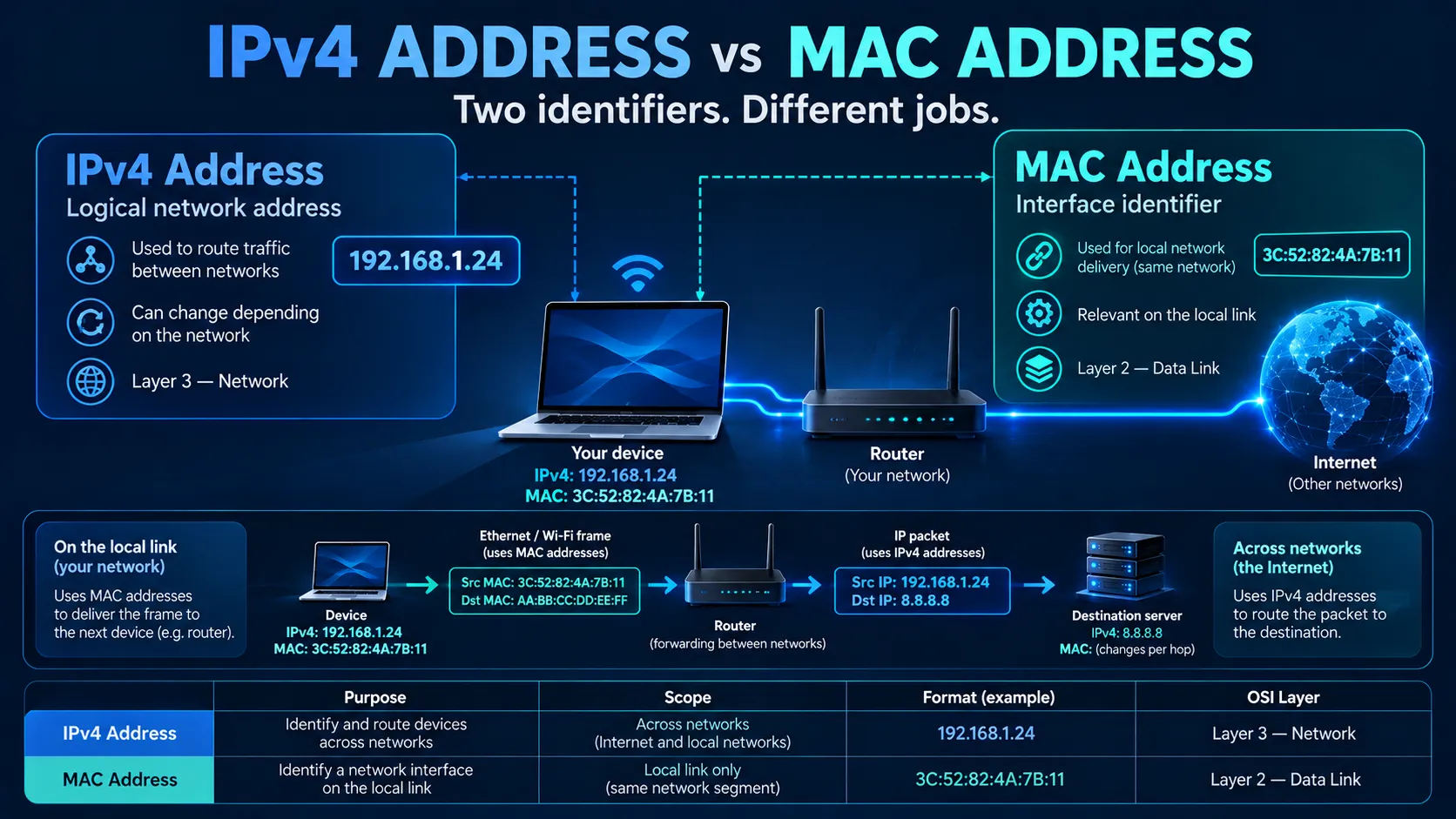
A computer connected to a network can have both an IPv4 address and a MAC address.
For example:
IPv4 address
192.168.1.20
MAC address
00:1A:2B:3C:4D:5E
Although both are used to help network devices communicate, they perform different jobs.
An IPv4 address is used at the network layer to identify an interface within an IP network and help traffic move between networks.
A MAC address, meanwhile, is used by technologies such as Ethernet and Wi-Fi at the local-link layer to deliver frames between devices on the same local network.
The simplest distinction is:
IPv4 tells the network where traffic needs to go, while a MAC address helps deliver that traffic across the current local network link.
However, understanding the difference alone is not enough.
The more useful question is:
How does a computer use an IPv4 address and a MAC address together when it sends data?
That relationship explains concepts such as ARP, default gateways, switches, routers and even some forms of IP address conflict.
For a broader introduction to Internet addressing, see LARUS.Foundation's guide to What Is an IP Address and How Does It Work?.
What Is an IPv4 Address?
IPv4 stands for Internet Protocol version 4.
It uses 32-bit addresses, normally written as four decimal numbers separated by dots.
For example:
192.168.1.20
or:
203.0.113.25
An IPv4 address provides logical network addressing.
This means that the address is associated with how a device or interface participates in an IP network rather than being permanently tied to the physical hardware.
For example, a laptop could use:
192.168.1.20
at home.
Later, it could connect to an office network and receive:
10.20.30.45
The computer has not physically changed.
Instead, its IPv4 configuration has changed according to the network it joined.
IPv4 addresses may be:
- configured manually,
- assigned automatically through DHCP,
- private addresses used within local networks,
- or public addresses used across the Internet.
Therefore, IPv4 addresses are primarily concerned with network addressing and routing.
What Is a MAC Address?
MAC stands for Media Access Control.
MAC addresses are commonly used by IEEE 802 networking technologies, particularly Ethernet and Wi-Fi.
A typical MAC address may appear as:
00:1A:2B:3C:4D:5E
A traditional Ethernet MAC address is normally 48 bits long.
In many devices, the network interface has a hardware-associated MAC address assigned by the manufacturer.
However, it is important not to describe a MAC address as an unchangeable hardware fingerprint.
Modern operating systems can use:
- locally administered MAC addresses,
- randomized MAC addresses,
- temporary MAC addresses,
- or software-configured addresses.
MAC randomization is particularly common on Wi-Fi devices because using the same stable MAC address everywhere can create privacy concerns.
Therefore, a more accurate definition is:
A MAC address is a link-layer address used to identify an interface for communication on a local network segment.
IPv4 Address vs MAC Address
The key differences are easier to understand in one table.
| IPv4 Address | MAC Address |
|---|---|
| Operates at the network layer | Operates at the local-link / data-link layer |
| IPv4 uses 32 bits | Common Ethernet MAC addresses use 48 bits |
Example: 192.168.1.20 | Example: 00:1A:2B:3C:4D:5E |
| Used for IP routing | Used for local frame delivery |
| Can change when the device changes networks | Often associated with an interface, but can also be randomized or changed |
| Routers make forwarding decisions using IP information | Ethernet switches learn and forward using MAC information |
| Can communicate across routed networks | Primarily meaningful on the current local link |
| ARP can map an IPv4 address to a local MAC address | Used by ARP as the link-layer destination |
The most important difference is scope.
An IPv4 address can remain relevant as a packet travels across multiple networks.
A MAC address generally applies only to the current local network segment.
How Do IPv4 and MAC Addresses Work Together?
Consider two computers connected to the same office network.
Computer A
IPv4: 192.168.1.20
MAC: 00:11:22:33:44:55
Computer B
IPv4: 192.168.1.50
MAC: 66:77:88:99:AA:BB
Computer A wants to send data to:
192.168.1.50
At the IP layer, Computer A already knows the destination IPv4 address.
However, Ethernet needs something else.
It needs the destination MAC address for the local Ethernet frame.
Therefore, the computer needs to determine:
Which MAC address currently corresponds to 192.168.1.50?
This is where ARP becomes important.
What Is ARP?
ARP stands for Address Resolution Protocol.
For ordinary IPv4 communication on an Ethernet-style local network, ARP helps resolve an IPv4 address into the corresponding local link-layer address.
The process can be simplified as:
Known IPv4 address
↓
ARP lookup
↓
MAC address discovered
↓
Ethernet frame created
↓
Traffic delivered locally
RFC 826 originally defined ARP as a method for translating protocol addresses, such as IP addresses, into local network hardware addresses such as Ethernet addresses.
Example: ARP Request
Computer A wants to reach:
192.168.1.50
but does not yet know its MAC address.
It can effectively ask the local network:
Who has 192.168.1.50?
Computer B recognises its own IPv4 address and replies with its MAC address.
Computer A then learns:
192.168.1.50 → 66:77:88:99:AA:BB
This information can be temporarily stored in the computer's ARP cache.
The device does not need to repeat the entire discovery process for every packet while that entry remains valid.
Practical Example: Sending Data on the Same Network
Suppose:
Laptop
IPv4: 192.168.1.20
MAC: AA:AA:AA:AA:AA:01
Printer
IPv4: 192.168.1.80
MAC: BB:BB:BB:BB:BB:02
The laptop wants to send a print job.
The process is roughly:
1. Laptop checks the destination IPv4 address
Destination:
192.168.1.80
2. Laptop determines that the printer is on the local network
It therefore does not need to send the packet to a router first.
3. Laptop checks its ARP cache
Does it already know the MAC address associated with 192.168.1.80?
If not, it performs ARP.
4. Printer responds
The laptop learns:
192.168.1.80 → BB:BB:BB:BB:BB:02
5. Laptop builds the Ethernet frame
The local Ethernet frame contains:
Source MAC: Laptop MAC
Destination MAC: Printer MAC
Inside that frame is the IPv4 packet containing:
Source IPv4: 192.168.1.20
Destination IPv4: 192.168.1.80
Therefore, the communication contains both types of addresses.
They simply operate at different layers.
Does a Switch Use IPv4 or MAC Addresses?
A normal Ethernet switch primarily forwards Ethernet frames using MAC addresses.
For example, the switch may learn:
| Switch Port | Learned MAC |
|---|---|
| Port 1 | AA:AA:AA:AA:AA:01 |
| Port 2 | BB:BB:BB:BB:BB:02 |
| Port 3 | CC:CC:CC:CC:CC:03 |
When a frame arrives for:
BB:BB:BB:BB:BB:02
the switch can forward it toward the appropriate port.
Therefore:
A Layer 2 Ethernet switch primarily cares about MAC addresses rather than deciding where an IPv4 packet should go across different IP networks.
More advanced switches can also perform Layer 3 routing, so the distinction depends on the device's configured role.
Does a Router Use IPv4 or MAC Addresses?
A router uses IP addressing to decide where packets should go between networks.
Suppose your laptop has:
192.168.1.20
and wants to reach:
8.8.8.8
The destination is not part of the laptop's local subnet.
Therefore, the laptop sends the packet toward its default gateway.
For example:
Laptop
192.168.1.20
Default gateway
192.168.1.1
The laptop therefore needs the gateway's MAC address for the local Ethernet delivery.
The process becomes:
Destination IPv4 is remote
↓
Use routing table
↓
Select default gateway
↓
Find gateway MAC using ARP
↓
Send frame to router
This is an important distinction.
The laptop does not need to know the MAC address of a distant Internet server.
It only needs the MAC address of the next local device responsible for forwarding the traffic.
What Happens to the MAC Address When Traffic Crosses a Router?
MAC addresses generally do not travel unchanged across the entire Internet.
Consider:
Laptop → Home Router → ISP Router → Internet → Server
On the first local link:
Source MAC: Laptop
Destination MAC: Home router
After the router receives the frame, it removes the local link-layer framing and processes the IP packet.
When forwarding the packet onto another link, it creates new link-layer framing appropriate for that next network.
Therefore:
Link 1
Laptop MAC → Router MAC
Link 2
Router/interface MAC → Next-hop MAC
Link 3
Another local-link addressing relationship
The link-layer addresses can change at every hop.
Meanwhile, the IPv4 packet continues toward its IP destination.
In a simplified case without NAT:
Source IPv4: remains the original source
Destination IPv4: remains the remote destination
while:
Source MAC / destination MAC: change between local links.
This is one of the clearest differences between IPv4 and MAC addressing.
IPv4 Address vs MAC Address Across a Router
| Information | Same local network | Across routers |
|---|---|---|
| Destination IPv4 | Used | Used |
| Source IPv4 | Used | Normally remains relevant end-to-end |
| Destination MAC | Used for local delivery | Replaced for the next local link |
| Source MAC | Used for local delivery | Replaced for the next local link |
| ARP | May resolve local IPv4-to-MAC mapping | Used separately on relevant IPv4 local links |
Network Address Translation can modify the visible IP addressing as well, so IPv4 addresses should not always be assumed to remain unchanged across every network path.
Why Doesn't Your Computer Need the Website's MAC Address?
Suppose you open:
example.com
The server may be located thousands of kilometres away.
Your computer eventually determines an IP address for the website through DNS.
However, it does not discover the website server's Ethernet MAC address.
Instead, your computer determines that the destination is outside the local subnet.
It therefore sends the packet to the local default gateway.
The computer only needs:
Remote destination IPv4
plus:
Local router MAC
The router then forwards the IP packet toward the next network.
Consequently:
MAC addresses solve local-link delivery, while IP addresses make communication across interconnected networks possible.
IPv4 vs MAC vs Hostname
These three identifiers are also frequently confused.
| Identifier | Example | Main purpose |
|---|---|---|
| Hostname / domain name | example.com | Human-friendly or application-level naming |
| IPv4 address | 203.0.113.25 | Network addressing and routing |
| MAC address | 00:1A:2B:3C:4D:5E | Local-link delivery |
A simplified web connection might therefore look like:
Domain name
example.com
↓ DNS
IPv4 address
203.0.113.25
↓ routing decision
Next-hop IPv4 address
192.168.1.1
↓ ARP
Gateway MAC address
00:AA:BB:CC:DD:EE
Each identifier solves a different problem.
Can Two Devices Have the Same IPv4 Address?
Devices on separate private networks can use the same private IPv4 address.
For example:
A laptop in Malaysia may use:
192.168.1.20
while another laptop in the United Kingdom may also use:
192.168.1.20.
This is normal because the two private networks are separate.
However, if two devices on the same local network attempt to use the same IPv4 address unintentionally, an IP address conflict may occur.
The devices may interfere with each other's connectivity because the network can no longer reliably determine which interface should receive traffic for that address.
For a practical troubleshooting process, see How to Investigate an IP Address Conflict.
What Happens to MAC Addresses During an IPv4 Conflict?
MAC addresses can help reveal an IPv4 conflict.
Imagine:
Device A
IPv4: 192.168.1.80
MAC: AA:AA:AA:AA:AA:01
Device B
IPv4: 192.168.1.80
MAC: BB:BB:BB:BB:BB:02
Both devices claim the same IPv4 address.
Other systems may observe changing or conflicting ARP information:
192.168.1.80 → AA:AA:AA:AA:AA:01
then:
192.168.1.80 → BB:BB:BB:BB:BB:02
This can cause traffic to reach the wrong device or connectivity to become unstable.
Therefore, MAC addresses are often useful evidence when troubleshooting an IPv4 conflict.
RFC 5227 specifically defines mechanisms for IPv4 Address Conflict Detection using ARP.
Can Two Devices Have the Same MAC Address?
MAC addresses are expected to be unique where uniqueness is required for communication on the same local network.
However, duplicate MAC addresses can occur because of:
- manual configuration,
- virtual machines,
- cloned systems,
- software-defined interfaces,
- incorrect device configuration,
- or randomization collisions.
Two devices using the same MAC address on the same Layer 2 network can create forwarding problems because switches may repeatedly relearn the same MAC address on different ports.
This differs from an IP conflict.
IPv4 Conflict vs MAC Conflict
| IPv4 Conflict | MAC Conflict |
|---|---|
| Two devices claim the same IPv4 address | Two interfaces use the same MAC address |
| Can create ARP instability | Can confuse Layer 2 switching |
| Primarily an IP addressing issue | Primarily a local-link addressing issue |
| DHCP/static configuration is a common cause | Cloning, virtualization or manual configuration may be involved |
| ARP evidence can help identify devices | Switch MAC tables can help investigate |
Is a MAC Address Permanent?
Not necessarily.
Historically, MAC addresses were often treated as stable identifiers associated with network-interface hardware.
However, modern networks require more nuance.
Operating systems can use MAC address randomization, particularly on Wi-Fi networks.
Instead of exposing the same hardware-associated MAC address everywhere, the device may generate a different locally administered address.
For example:
Home Wi-Fi
Device uses MAC A
Airport Wi-Fi
Device uses MAC B
Shopping centre Wi-Fi
Device uses MAC C
The purpose is to make passive tracking across different networks more difficult.
RFC 9797 explains that vendors and operating-system developers have increasingly implemented randomized or changing MAC addresses partly because of privacy concerns associated with linking a device, its network activity, location and user.
Therefore:
A MAC address should not automatically be treated as a permanent identity for a person or device.
Can a MAC Address Identify a Person?
Not reliably by itself.
A MAC address may identify an interface participating on a particular local network, but several limitations apply:
- MAC addresses can be changed.
- Devices can use randomized addresses.
- One person can own multiple devices.
- A device can have multiple interfaces and MAC addresses.
- Virtual machines can have virtual MAC addresses.
- Network administrators may see the address, while remote Internet services generally do not see the original local MAC.
Therefore, a MAC address should not be treated as proof of a person's identity.
This is similar to the need for caution when interpreting an IP address.
Network identifiers provide technical evidence, but the identifier and the human using a system are not necessarily the same thing.
Can Websites See Your MAC Address?
Normally, a website on the public Internet does not receive the original Ethernet or Wi-Fi MAC address of your computer.
The reason is that link-layer addressing changes as traffic moves from one network link to another.
For example:
Laptop MAC
is relevant between:
Laptop ↔ local Wi-Fi/router
but the website may be many routers away.
Those intermediate routers replace local link-layer framing as packets are forwarded.
Therefore, a remote website typically sees network-layer information such as the public IP address associated with the connection, not the laptop's original local MAC address.
Does IPv6 Use MAC Addresses?
IPv6 networks can still run over Ethernet and Wi-Fi, so link-layer MAC addresses remain relevant.
However, IPv6 does not use ARP in the same way IPv4 does.
Instead, IPv6 uses Neighbor Discovery, which is based on ICMPv6, for functions including discovering neighbouring nodes and resolving link-layer addresses.
Therefore:
IPv4
IPv4 address → ARP → MAC address
while conceptually:
IPv6
IPv6 address → Neighbor Discovery → link-layer address
This is another reason ARP should be described specifically in relation to IPv4 rather than as a universal IP mechanism.
Why Do Networks Need Both IPv4 and MAC Addresses?
It may seem inefficient to use two different address systems.
However, they solve different networking problems.
IPv4 solves the inter-network problem
The Internet is made up of many separate networks.
IPv4 provides addressing that routers can use to forward packets between those networks.
MAC addresses solve the local-link problem
Ethernet and Wi-Fi still need a mechanism to deliver data between interfaces sharing a local link.
MAC addressing provides that local delivery mechanism.
Therefore:
IPv4
answers:
Where should this packet ultimately go through the IP network?
while:
MAC
answers:
Which interface on this local link should receive this frame next?
Together, the two layers allow local networks to connect into much larger routed networks.
Practical IPv4 and MAC Troubleshooting Checklist
When investigating a local IPv4 connectivity problem, check:
- the device's current IPv4 address,
- subnet mask,
- default gateway,
- DHCP assignment,
- MAC address,
- ARP cache,
- whether another MAC is claiming the same IPv4 address,
- the switch port associated with the MAC,
- whether MAC randomization is enabled,
- and whether the destination is local or routed.
A useful troubleshooting flow is:
What IPv4 address does the device have?
↓
Is the destination local?
↓
What MAC does ARP associate with the destination?
↓
Does the switch see that MAC where expected?
↓
Is another device claiming the same IPv4 or MAC?
This approach is usually more useful than examining IP addresses or MAC addresses in isolation.
When Do Businesses Need to Rent IPv4 Addresses?
Understanding the difference between an IPv4 address and a MAC address also helps explain why businesses may need additional IPv4 resources. A MAC address mainly identifies a network interface within a local network, whereas an IPv4 address is used to identify and route devices across different networks.
As businesses expand their servers, cloud environments, hosting platforms, VPN infrastructure, or other Internet-facing services, their existing IPv4 allocation may no longer be sufficient. In these situations, they can Rent IPv4 Address resources instead of purchasing address blocks outright.
IPv4 leasing can provide additional address capacity while reducing the upfront cost associated with buying IPv4 space. For production environments, businesses should also consider factors such as routing stability, IP reputation, reverse DNS (rDNS), RPKI/ROA configuration, abuse management, geolocation accuracy, and renewal continuity.
Therefore, while MAC addresses remain primarily relevant within the local network, IPv4 addresses have a broader operational role and may need to be obtained, assigned, or leased as an organisation's Internet infrastructure grows.
Conclusion
IPv4 addresses and MAC addresses are both network identifiers, but they solve different problems.
An IPv4 address provides logical network addressing and helps routers move packets between networks.
A MAC address provides local-link addressing for technologies such as Ethernet and Wi-Fi.
When two IPv4 devices communicate on a local network, ARP connects these two layers:
Destination IPv4 address
↓
ARP resolution
↓
Destination MAC address
↓
Local Ethernet delivery
When traffic leaves the local network, the distinction becomes even clearer.
The IPv4 packet continues toward its routed destination, while the local MAC addresses are replaced as the packet moves between different network links.
Therefore, the simplest way to remember the relationship is:
IPv4 identifies where traffic needs to go across an IP network. A MAC address identifies where the current local frame needs to go next.
Understanding both makes other networking concepts—ARP, DHCP, switches, routers, default gateways and IP address conflicts—much easier to understand.
Frequently Asked Questions
1. What is the main difference between an IPv4 address and a MAC address?
An IPv4 address is a logical network-layer address used for communication and routing across IP networks. A MAC address is a link-layer address used for local communication on technologies such as Ethernet and Wi-Fi.
2. Is a MAC address the same as an IP address?
No. They operate at different networking layers and serve different purposes. A device can have both an IPv4 address and a MAC address at the same time.
3. Does an IPv4 address contain a MAC address?
No. An IPv4 address does not contain the device's MAC address. Protocols such as ARP can be used on a local IPv4 network to discover which MAC address currently corresponds to an IPv4 address.
4. Does a router use IP addresses or MAC addresses?
A router uses IP addresses to make routing decisions between networks. However, when transmitting over an Ethernet or Wi-Fi local link, it may also use MAC addresses for local frame delivery. Therefore, routers can work with both addressing layers for different purposes.
5. Does a switch use IP addresses or MAC addresses?
A traditional Layer 2 Ethernet switch primarily learns and forwards traffic using MAC addresses. Layer 3 switches can additionally perform IP routing functions.
6. Can I find someone's MAC address from their public IPv4 address?
Normally, no. A remote public IPv4 address does not reveal the original device's local MAC address. MAC addressing is generally limited to the local network link and changes as traffic passes through routers.
7. Can websites see my MAC address?
Normally, Internet websites cannot see the original Wi-Fi or Ethernet MAC address of your device because MAC addresses are not forwarded end-to-end through Internet routers.
8. What is ARP?
ARP stands for Address Resolution Protocol. On an IPv4 local network, ARP helps determine the local link-layer address associated with an IPv4 address.
9. Does IPv6 use ARP?
No. IPv6 uses Neighbor Discovery based on ICMPv6 instead of IPv4's ARP mechanism.
10. Can a MAC address change?
Yes. Although many interfaces have manufacturer-assigned MAC addresses, software can also use locally administered or randomized MAC addresses. Modern devices commonly use MAC randomization for Wi-Fi privacy.
11. Can two devices have the same IPv4 address?
Devices on separate networks can use the same private IPv4 address. However, two devices unintentionally using the same IPv4 address on the same local network can create an IP address conflict.
12. Can two devices have the same MAC address?
Duplicate MAC addresses can occur, especially through manual configuration, virtualization or cloning. If both interfaces operate on the same Layer 2 network, the duplication can cause switching and connectivity problems.
References
- RFC 826 — An Ethernet Address Resolution ProtocolRFC Editor / Internet Engineering standards documentation.
- RFC 1122 — Requirements for Internet Hosts: Communication LayersDefines and discusses host requirements across the link, IP and transport layers.
- RFC 5227 — IPv4 Address Conflict DetectionDefines mechanisms for detecting IPv4 address conflicts using ARP.
- RFC 9797 — Randomized and Changing Media Access Control (MAC) Addresses: Context, Network Impacts, and Use CasesCovers MAC address randomization, privacy considerations and operational impacts.
- RFC 9724 — State of Affairs for Randomized and Changing Media Access Control (MAC) AddressesDiscusses changing MAC addresses and their role in privacy and IEEE 802 networks.
- IEEE Standards Association — MAC AddressesProvides information about IEEE MAC addressing and EUI address assignments.