
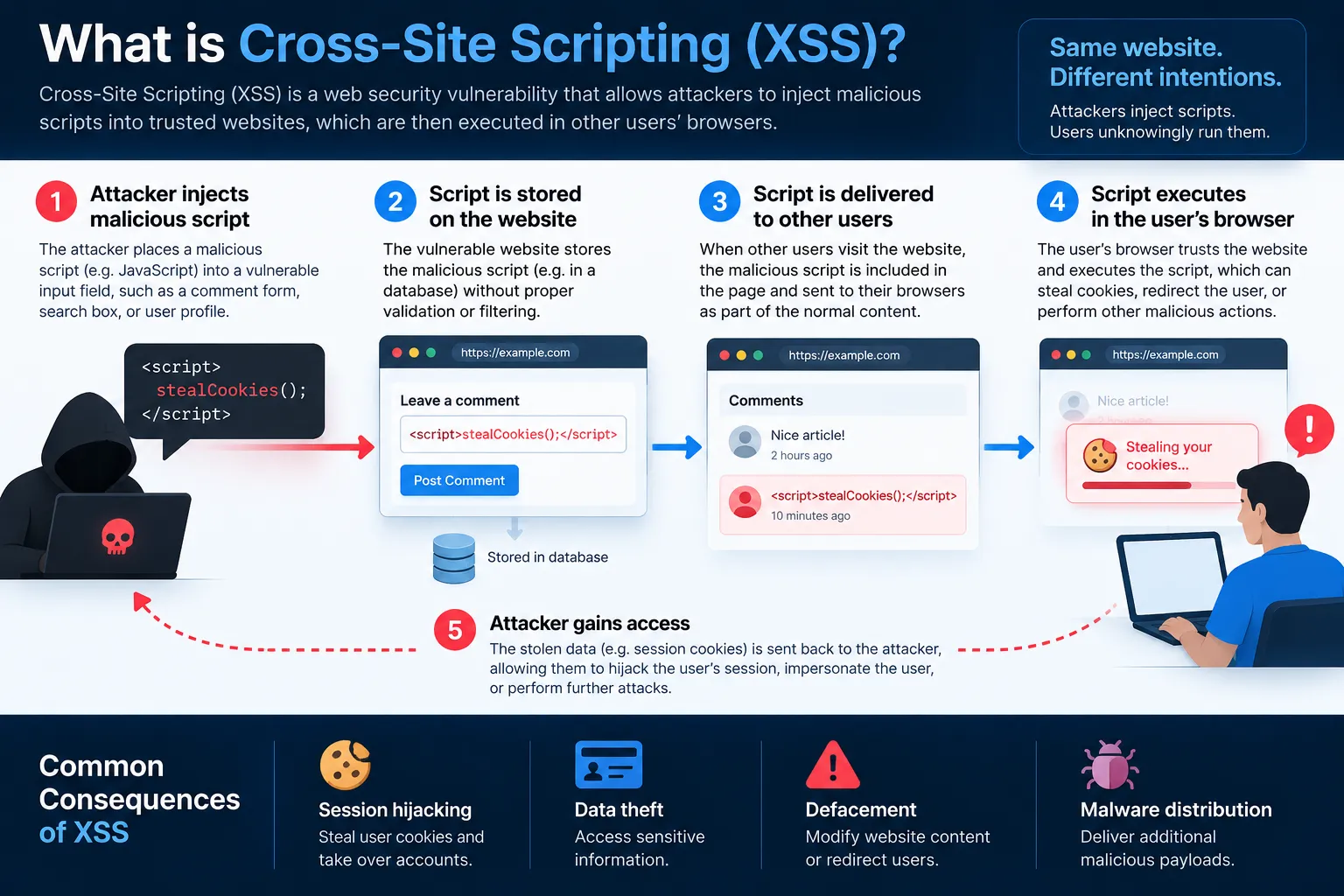
Cross-Site Scripting, commonly known as XSS, is a web security vulnerability that occurs when a website allows untrusted content to be interpreted as active browser content instead of ordinary data. As a result, attacker-controlled content may execute inside another user's browser within the context of the affected website.
For example, a vulnerable comment section might accept user input and later display it without safely handling the content. Instead of showing the input only as text, the browser may interpret part of it as executable content.
The basic problem is therefore:
The application fails to keep untrusted data separate from content that the browser can execute.
OWASP explains that XSS can lead to consequences such as account impersonation, sensitive-data exposure, malicious content loading and other unwanted actions in a user's browser. XSS is only one part of the wider application-security landscape. For a broader view of ransomware, phishing, software vulnerabilities and other risks, see LARUS.Foundation's guide to Cybersecurity Threats.
What Is Cross-Site Scripting?
Cross-Site Scripting happens when attacker-controlled input reaches a webpage in a way that allows the browser to treat it as executable content.
A normal web application might receive:
- a search term,
- a comment,
- a username,
- a profile description,
- a URL parameter,
- or content submitted through an API.
The application then displays that information.
Normally, the browser should see it simply as data.
However, if the application inserts the content into an unsafe context, the browser may interpret it as HTML or JavaScript.
The difference can be simplified like this:
Safe application
User input
↓
Application
↓
Safe output handling
↓
Browser displays text
Vulnerable application
User input
↓
Application
↓
Unsafe output handling
↓
Browser interprets active content
↓
XSS
Therefore, XSS is not simply about someone typing JavaScript into a form.
The real issue is how the application handles and renders untrusted information.
How Does XSS Work?
The easiest way to understand XSS is to follow how user-controlled information reaches another user's browser.
A simplified flow looks like:
Attacker-controlled input
↓
Website or application
↓
Input is reflected, stored or processed
↓
Victim opens affected page
↓
Browser receives unsafe content
↓
Browser interprets it in the website's context
Step 1: Attacker-Controlled Data Enters the Application
Suppose a website allows visitors to post comments.
A normal comment could be:
"Great article. Thanks for sharing."The website stores the comment and later displays it to other users. At this point, allowing user input is not itself a vulnerability. The security problem depends on what happens next.
Step 2: The Application Returns the Content
When another visitor opens the page, the server retrieves the saved comment and includes it in the page.
If the application safely handles the content, the browser simply displays:
Great article. Thanks for sharing.
However, if the application inserts user-controlled content into HTML without proper encoding or sanitization, specially crafted input may be interpreted as active browser content.
Step 3: The Browser Interprets the Content
The browser does not know whether particular HTML or JavaScript originally came from:
- the website developer,
- a database,
- a URL,
- or another user.
It simply processes the page it receives.
Therefore, if unsafe content has already been included in an executable context, the browser may process it as though it were part of the legitimate website.
This is the key point:
In an XSS attack, the vulnerable website can become the delivery mechanism for attacker-controlled content.
The attacker does not necessarily need to compromise the victim's device directly.
Instead, the victim's browser trusts content delivered in the context of the affected website.
Normal Website Behaviour vs XSS
| Normal behaviour | XSS vulnerability |
|---|---|
| User input is treated as data | User input may become executable content |
| Browser displays text | Browser may interpret HTML or JavaScript |
| Website controls page behaviour | Attacker-controlled input may influence behaviour |
| Other users see intended content | Visitors may receive malicious content |
| Safe rendering APIs are used | Unsafe rendering contexts may be used |
Consequently, preventing XSS is mainly about controlling how untrusted data enters HTML, JavaScript, URLs and the DOM.
Practical Example 1: Stored XSS in a Comment Section
Consider a forum where registered users can leave comments.
The normal flow is:
User writes comment
↓
Website stores comment
↓
Database saves content
↓
Other users open the page
↓
Comment is displayed
Now suppose the website accepts attacker-controlled content and later places it into the page without appropriate protection.
The flow becomes:
Attacker submits malicious content
↓
Website stores it
↓
Victim opens discussion page
↓
Stored content is inserted into page
↓
Browser processes unsafe content
This is known as Stored XSS, sometimes called persistent XSS.
The important characteristic is that the malicious content is stored somewhere, such as:
- a database,
- a comment,
- a user profile,
- a forum post,
- or another persistent field.
Therefore, the attacker may not need to send a separate malicious link to every victim.
Anyone who loads the affected content could potentially encounter the malicious content.
Practical Example 2: Reflected XSS in Search Results
Consider a website search function.
A user searches:
Laptop
The page displays:
Search results for: Laptop
The application may receive the search term through a URL:
example.com/search?q=Laptop
Then it places the value of q into the page.
Normally:
URL input → Application → Safe output → Search text displayed
However, if the application inserts the value directly into an unsafe HTML context, specially crafted input may be reflected back into the page.
The flow becomes:
Attacker creates crafted URL
↓
Victim opens URL
↓
Website reflects input into response
↓
Browser processes unsafe content
This is known as Reflected XSS. Unlike Stored XSS, the malicious content is typically not permanently stored by the application. Instead, it is included in the request and immediately reflected in the response. Stored XSS vs Reflected XSS vs DOM-Based XSS
The three main categories are easier to compare in one table.
| XSS type | Where attacker-controlled data comes from | Typical example | Where unsafe processing occurs |
|---|---|---|---|
| Stored XSS | Data stored by the application | Comment or profile field | When stored content is rendered |
| Reflected XSS | Current HTTP request | Search parameter or URL | Server response |
| DOM-based XSS | Client-side data source | URL fragment or browser data | JavaScript running in browser |
Although the attack paths differ, the underlying problem remains similar:
Untrusted data reaches a context where the browser may execute it rather than treating it as ordinary data.
What Is DOM-Based XSS?
DOM-based XSS occurs mainly inside client-side JavaScript.
Instead of the server generating the vulnerable content, browser-side code reads attacker-controlled information and inserts it into the Document Object Model, or DOM, in an unsafe way.
For example:
URL data
↓
JavaScript reads value
↓
JavaScript uses unsafe DOM API
↓
Browser interprets content
MDN explains that DOM-based XSS can occur when attacker-controlled data is passed to browser APIs that interpret strings as HTML or executable content.
Potentially dangerous sinks include APIs such as:
innerHTML
document.write()
This distinction matters because an application may appear secure on the server side while still introducing vulnerabilities through JavaScript running in the browser.
What Can XSS Do?
The actual impact depends on the website, the victim's permissions and the application's security controls.
| Possible impact | Practical meaning |
|---|---|
| Account impersonation | Attacker may perform actions using a victim's session |
| Sensitive data exposure | Information available to the page may be accessed |
| Fake forms | Malicious login or payment interfaces may be inserted |
| Page modification | Website content may be altered for the victim |
| User redirection | Victims may be sent to malicious destinations |
| Keystroke monitoring | Input entered into affected pages may potentially be observed |
| Actions as the user | Requests may be performed using the victim's existing permissions |
However, not every XSS vulnerability has the same impact.
For example, browser protections, cookie settings, Content Security Policy and application permissions may limit what an attacker can do.
Therefore, it would be inaccurate to say:
"Every XSS vulnerability lets attackers steal all cookies."
The more accurate conclusion is:
The impact of XSS depends on what the affected browser session can access and which additional security controls are present.
XSS vs SQL Injection
XSS and SQL Injection are both injection-related vulnerabilities, but they affect different layers.
| SQL Injection | Cross-Site Scripting |
|---|---|
| Targets database query handling | Targets browser content handling |
| Input changes SQL query structure | Input becomes active browser content |
| Mainly affects server/database systems | Mainly affects users viewing a page |
| Can expose or modify database data | Can influence actions within a browser session |
| Main defence includes parameterized queries | Main defence includes contextual encoding and safe rendering |
Therefore:
SQL Injection is primarily a database query problem, while XSS is primarily a browser content interpretation problem.
For a deeper explanation of database injection, see LARUS.Foundation's guide to SQL Injection and how unsafe query construction allows user-controlled data to influence database commands.
Why XSS Is Still Relevant in Modern Web Applications
Modern frameworks such as React, Angular and other templating systems often include automatic escaping or safe rendering behaviour.
As a result, developers can avoid many common XSS problems by using framework features correctly.
However, vulnerabilities can still appear when developers:
- bypass framework protections,
- insert raw HTML,
- use unsafe DOM APIs,
- trust URL parameters,
- process rich text incorrectly,
- or integrate third-party components without sufficient protection.
OWASP notes that modern frameworks can reduce XSS risk through templating and automatic escaping. However, developers can still introduce vulnerabilities when they deliberately bypass those protections.
Meanwhile, automation is also changing how attackers identify and exploit security weaknesses. For a broader look at how artificial intelligence can augment existing attack methods, see LARUS.Foundation's comparison of AI-powered attacks and traditional cyberattacks.
Importantly, AI does not fundamentally change what XSS is.
The vulnerability still exists because of unsafe data handling.
Instead, automation may make reconnaissance, vulnerability discovery or campaign scaling more efficient.
How to Prevent Cross-Site Scripting
There is no single universal control that prevents every form of XSS.
Instead, developers need to use the correct protection for the context where data is being rendered.
The main controls include:
- contextual output encoding,
- safe framework features,
- HTML sanitization,
- safe DOM APIs,
- Content Security Policy as defence in depth.
1. Use Contextual Output Encoding
If user-controlled data should appear only as text, the application should encode it appropriately before placing it into the page.
Conceptually:
Unsafe
User-controlled data
↓
Inserted directly into HTML
↓
Browser may interpret it
Safer
User-controlled data
↓
Correct output encoding
↓
Browser displays it as data
OWASP recommends output encoding when an application needs to display user-controlled information.
However, the correct encoding depends on context.
HTML, URLs, JavaScript, CSS and HTML attributes are parsed differently.
Therefore:
There is no single encoding function that is correct for every output context.
2. Use Framework Security Features
Modern frameworks often provide automatic escaping.
Therefore, developers should use the framework's safe defaults wherever possible.
For example, displaying a username through a normal text-rendering mechanism is generally safer than manually constructing raw HTML from that value.
Problems often appear when developers deliberately bypass built-in protections to insert raw content.
Consequently, developers should understand which APIs:
- display text safely,
- insert HTML,
- or allow direct DOM manipulation.
3. Sanitize HTML When Users Need Rich Content
Sometimes an application intentionally allows users to submit HTML.
Examples include:
- rich-text editors,
- formatted blog posts,
- support tickets,
- CMS content.
In this situation, simply encoding everything may remove required formatting.
Instead, the application needs HTML sanitization.
Sanitization allows permitted formatting while removing dangerous elements, attributes or URLs.
OWASP recommends using established sanitization libraries rather than attempting to build a custom HTML sanitizer. It identifies DOMPurify as one commonly used option.
Moreover, sanitization libraries should remain updated because browser behaviour changes and new bypass techniques can be discovered.
4. Avoid Unsafe DOM APIs
Client-side applications should avoid sending untrusted strings into browser APIs that interpret them as HTML or executable content.
Potentially dangerous APIs include:
innerHTML
document.write()
eval()
Where an application only needs to display text, text-oriented APIs are generally safer.
The principle is simple:
Need to display text?
Use an API that treats the value as text.
Need to render HTML?
Use controlled and sanitized HTML.
MDN describes dangerous destinations of this type as injection sinks, because strings sent to them can potentially be interpreted as active content.
5. Use Content Security Policy as an Additional Layer
A Content Security Policy, or CSP, tells browsers which scripts and other resources a website is allowed to execute or load.
A strong CSP can reduce the impact of certain XSS vulnerabilities by restricting:
- external script sources,
- inline scripts,
- unsafe JavaScript behaviour,
- and other executable resources.
However, CSP should be treated as defence in depth.
OWASP specifically warns against relying on CSP as the primary XSS defence.
Therefore:
Better security model
Safe rendering
+
Output encoding
+
Sanitization where needed
+
Safe DOM APIs
+
CSP
Not:
Unsafe application
+
CSP
What Are Trusted Types?
Trusted Types are another browser security mechanism designed to reduce DOM-based XSS risk.
They can restrict certain sensitive DOM APIs so that they no longer accept ordinary strings directly.
Instead, the application must supply an approved trusted value.
Conceptually:
Without Trusted Types
Untrusted string
↓
Sensitive DOM API
↓
Browser interprets HTML
With Trusted Types enforcement
Untrusted string
↓
Approved transformation or sanitization
↓
Trusted value
↓
Sensitive DOM API
MDN explains that Trusted Types can help protect applications against client-side XSS by requiring data to pass through approved policies before being sent to sensitive browser APIs.
Trusted Types can therefore provide another useful defensive layer for JavaScript-heavy applications.
XSS Prevention Comparison
| Defence | Recommended? | Main purpose |
|---|---|---|
| Contextual output encoding | Yes | Prevents data from becoming executable content |
| Safe framework defaults | Yes | Reduces unsafe rendering |
| HTML sanitization | Yes, when HTML is allowed | Removes dangerous HTML |
| Safe DOM APIs | Yes | Reduces DOM-based XSS |
| Content Security Policy | Yes, additional layer | Restricts executable content |
| Trusted Types | Useful additional control | Restricts dangerous DOM sinks |
| HttpOnly cookies | Additional protection | Limits JavaScript access to certain cookies |
| Input filtering alone | Not sufficient | Does not address every output context |
The most important point is that XSS prevention is context-dependent.
A defence that works for plain HTML text may not be correct for:
- JavaScript,
- URLs,
- CSS,
- HTML attributes,
- or rich HTML content.
Why Input Filtering Alone Is Not Enough
A developer might try to prevent XSS by blocking words such as:
script
or particular special characters. However, this is not a reliable primary defence. Browsers interpret content in many different ways.
Moreover, XSS can occur through:
- event handlers,
- URLs,
- SVG,
- DOM operations,
- attributes,
- JavaScript contexts,
- or other browser features.
Therefore, trying to maintain a blacklist of every possible dangerous pattern is fragile.
The stronger principle is:
Protect the point where data is rendered, not only the point where it enters the application.
Input validation is still useful for enforcing business rules. For example, if a field should contain only a number, the application should reject unrelated values.
However, validation does not replace proper output handling. XSS and Browser Cookies
XSS is often described as a way to steal cookies.
This requires more nuance.
Cookies configured with the HttpOnly attribute cannot normally be read directly through JavaScript.
Therefore, HttpOnly can reduce some risks involving session-cookie theft.
However, it does not eliminate XSS itself.
An attacker-controlled script may still potentially perform actions within the user's active session or access other browser-visible information.
Therefore:
HttpOnly helps reduce certain consequences of XSS; it does not prevent XSS execution.
Practical XSS Prevention Checklist
Before releasing a web application, developers should review the complete path that untrusted data takes before it reaches a browser.
Ask:
- Where does user-controlled data appear in pages?
- Does the framework automatically escape this output?
- Are developers bypassing automatic escaping?
- Are any values inserted using innerHTML or similar APIs?
- Can URL parameters reach the DOM?
- Can API responses contain attacker-controlled content?
- Does the application intentionally allow HTML?
- If HTML is allowed, is it sanitized?
- Are output protections appropriate for HTML, URL and JavaScript contexts?
- Is CSP deployed as an additional defence?
- Are cookies configured securely?
- Could Trusted Types reduce DOM-XSS exposure?
- Are XSS tests included in security testing?
Moreover, developers should test both:
server-side rendering
and
client-side JavaScript behaviour.
An application may safely generate its original HTML but later introduce a DOM-based XSS vulnerability through JavaScript.
XSS Prevention: What Not to Rely On
| Weak approach | Why it is insufficient |
|---|---|
Block the word script | XSS does not require one specific tag |
| Remove a few special characters | Browser contexts differ |
| Trust data because it came from your database | Stored data can still be attacker-controlled |
| Use CSP alone | Does not fix vulnerable rendering logic |
| Use HttpOnly cookies alone | Limits some impact but does not prevent XSS |
| Assume a modern framework prevents everything | Unsafe APIs can bypass built-in protections |
One particularly important lesson is:
Data coming from your own database should not automatically be considered safe.
If the original value was supplied by an attacker, storing it does not transform it into trusted data.
What Should You Do If You Find an XSS Vulnerability?
Identify the Source
Determine where attacker-controlled data enters:
- URL,
- database,
- API,
- form,
- third-party integration.
Identify the Sink
Then determine where that data becomes unsafe:
- HTML output,
- DOM manipulation,
- JavaScript,
- attribute,
- URL,
- CSS.
This can be represented as:
Source → Data flow → Unsafe sink
Fix the Root Cause
Depending on the vulnerability, remediation may involve:
- contextual output encoding,
- safe DOM APIs,
- HTML sanitization,
- removing unsafe rendering,
- enabling framework protections.
Add Defence in Depth
After fixing the vulnerability, organisations can consider additional controls such as:
- CSP,
- Trusted Types,
- secure cookie attributes,
- automated security tests.
Importantly, adding a WAF or CSP without fixing vulnerable application code should not be treated as complete remediation.
Conclusion
Cross-Site Scripting occurs when an application fails to maintain a safe boundary between:
untrusted data and content the browser can execute.
The typical failure path is:
Attacker-controlled input
→ Application
→ Unsafe rendering
→ Victim's browser
→ Content executes in website context
Therefore, preventing XSS requires more than simply filtering suspicious input. Developers need to understand where data comes from, how it moves through the application and where the browser eventually interprets it.
In practice, the most important controls are:
- use contextual output encoding,
- rely on safe framework defaults,
- sanitize HTML when rich content is required,
- avoid unsafe DOM APIs,
- and use CSP or Trusted Types as additional defensive layers.
Ultimately, XSS demonstrates the same broader security principle seen in many injection vulnerabilities:
Data should remain data unless the application explicitly and safely intends to treat it as code or markup.
Once developers maintain that boundary consistently, XSS becomes far easier to prevent.
Frequently Asked Questions
1. What is XSS in simple terms?
Cross-Site Scripting (XSS) is a web vulnerability where attacker-controlled content reaches a user's browser in a way that allows the browser to interpret it as active content instead of ordinary data.
2. What does XSS stand for?
XSS stands for Cross-Site Scripting. The abbreviation XSS is commonly used instead of CSS to avoid confusion with Cascading Style Sheets.
3. How does XSS work?
XSS occurs when untrusted input reaches a webpage or DOM in an unsafe context. The browser may then interpret that input as HTML or JavaScript rather than displaying it only as text.
4. What are the three main types of XSS?
The three commonly discussed categories are:
- Stored XSS
- Reflected XSS
- DOM-based XSS
5. What is Stored XSS?
Stored XSS occurs when attacker-controlled content is stored by an application and later displayed to users. Examples may include comments, user profiles and forum posts.
6. What is Reflected XSS?
Reflected XSS occurs when attacker-controlled information from a request is immediately included in an application's response. A crafted URL is a common delivery method.
7. What is DOM-based XSS?
DOM-based XSS occurs when client-side JavaScript takes attacker-controlled information and passes it into an unsafe browser API or DOM context.
8. What is the difference between XSS and SQL Injection?
SQL Injection interferes with database queries. XSS interferes with content processed by a user's browser. For more information, see LARUS.Foundation's guide to SQL Injection.
9. Can XSS steal passwords?
Potentially. If an XSS vulnerability allows attacker-controlled content to interact with a page, criminals may attempt to capture user input, insert fake login interfaces or abuse an active browser session. However, the actual impact depends on the website and its security controls.
10. Does Content Security Policy prevent XSS?
CSP can reduce the impact of certain XSS attacks, but it should be used as an additional security layer rather than the primary defence. Safe output handling and sanitization remain essential.
11. What is the best way to prevent XSS?
There is no single universal defence. The strongest approach combines:
- contextual output encoding,
- framework security features,
- sanitization when HTML is allowed,
- safe DOM APIs,
- and additional controls such as CSP.
References
- OWASP — Cross Site Scripting Prevention Cheat Sheet
https://cheatsheetseries.owasp.org/cheatsheets/Cross_Site_Scripting_Prevention_Cheat_Sheet.html
- MDN Web Docs — Cross-site scripting (XSS)
https://developer.mozilla.org/en-US/docs/Web/Security/Attacks/XSS
- MDN Web Docs — Content Security Policy (CSP )
https://developer.mozilla.org/en-US/docs/Web/HTTP/Guides/CSP
- MDN Web Docs — Trusted Types API
https://developer.mozilla.org/en-US/docs/Web/API/Trusted_Types_API
- MDN Web Docs — require-trusted-types-for CSP Directive
https://developer.mozilla.org/en-US/docs/Web/HTTP/Reference/Headers/Content-Security-Policy/require-trusted-types-for
- PortSwigger — Reflected DOM-Based Cross-Site Scripting
https://portswigger.net/kb/issues/00200311_cross-site-scripting-reflected-dom-based